
AI-assisted content creation and growth workflows for small businesses, creators, marketers, and founders
AI Social Media Automation for Small Business: A Practical, Human-Reviewed Workflow
A practical guide to using AI for research, short-form video, content repurposing, publishing, and performance review without surrendering control or building a bloated tool stack.
By MillsGuild Editorial ·

AI Social Media Automation for Small Business: A Practical, Human-Reviewed Workflow
AI can help a small business publish more consistently. The harder question is how to use it without creating more work, weakening the brand, or allowing unreviewed mistakes into public channels.
For many lean teams, content production is spread across several applications. Research happens in one place, scripts in another, video somewhere else, and scheduling in a separate dashboard. Each handoff requires context to be copied, reformatted, or rebuilt. That friction can make a modest publishing plan surprisingly difficult to maintain.
The American Psychological Association describes task switching as a process that requires the brain to shift goals and activate a different set of rules. For a solo founder or small marketing team, repeated movement between research, writing, editing, approval, and publishing can consume attention that would be better spent on customers and strategy.
A practical alternative is a human-reviewed workflow. Use AI for repeatable production tasks, keep people accountable for consequential decisions, and connect published content to a measurable learning loop.
What is AI social media automation?
AI social media automation uses artificial intelligence to support tasks such as topic research, drafting, video production, content adaptation, scheduling, and performance analysis.
The term does not have to mean handing an unsupervised system control of your brand. A responsible workflow keeps people involved in factual verification, positioning, customer context, disclosures, and final approval.
For most small businesses, the useful goal is narrower: reduce the manual effort between a sound idea and a reviewed, publishable asset.
Start with the workflow, not the AI tool
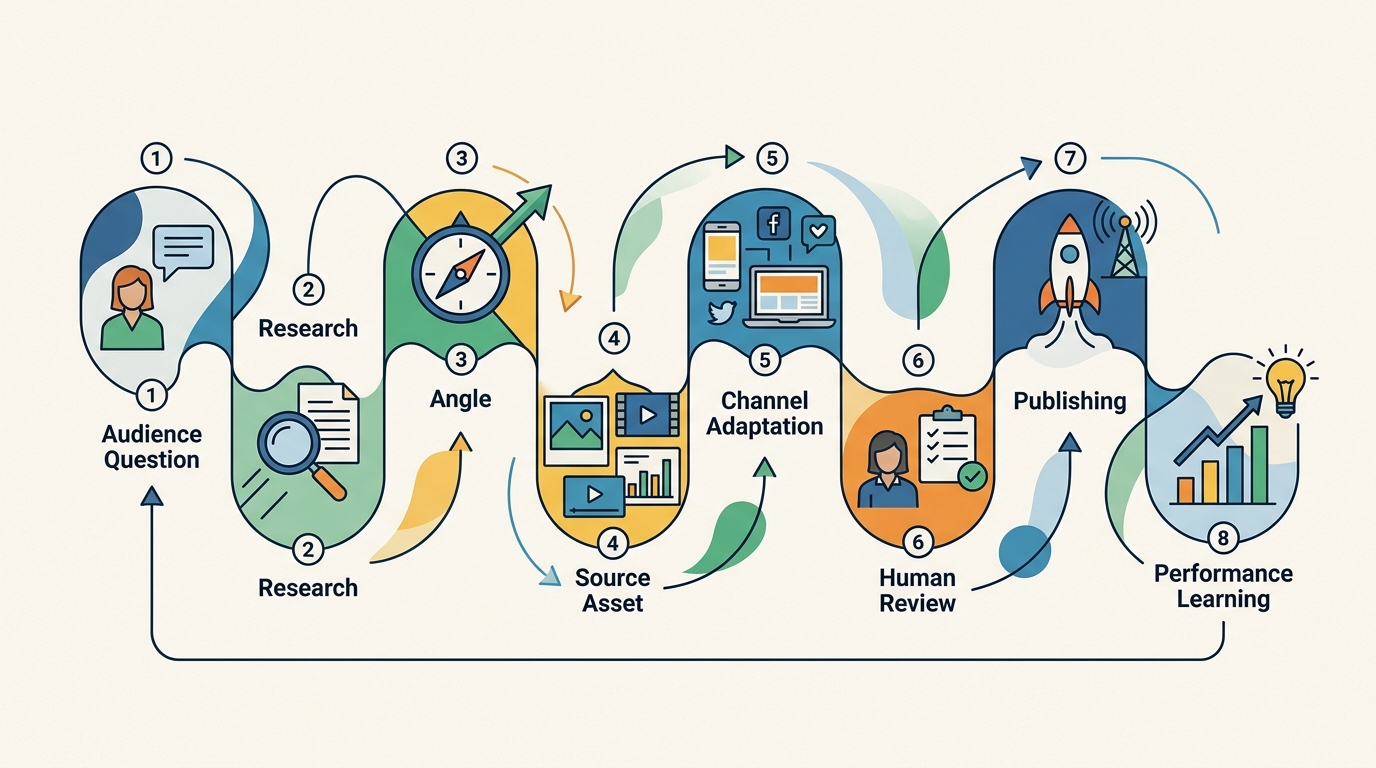
Choosing a video generator or writing assistant before mapping the work often leads to a stack of capable tools that do not share context well.
Begin with the process you need to complete:
- Identify an audience question or business objective.
- Research the topic and verify important claims.
- Choose a useful angle.
- Create an original source asset.
- Adapt that asset for relevant channels.
- Review and approve each version.
- Publish or schedule the content.
- Measure the response and use it to plan the next cycle.
This map makes the automation decisions clearer. Some steps are repetitive and easy to inspect. Others depend on judgment and accountability.
Adobe's research on agentic AI adoption points to data integration, data quality, and skills as implementation obstacles. Adding AI therefore does not automatically remove operational friction. If tools cannot share context or require constant manual repair, they may simply move the work to another part of the process.
A practical AI content and growth workflow
1. Define one business outcome
Start with the result the content should support, rather than a general instruction to create more posts.
Possible outcomes include:
- Answering common questions before a sales call
- Increasing qualified visits to a service page
- Explaining a product feature customers misunderstand
- Building awareness around a specific problem
- Turning existing expertise into a consistent educational series
The outcome affects the topic, format, call to action, and metric. A video intended to educate existing customers should not be judged by the same standard as a post introducing the brand to new people.
2. Build a small evidence-backed topic list
Use AI to accelerate research, not to replace it.
A research assistant can organize customer questions, identify recurring themes, summarize competitor positioning, and suggest related queries. Treat the output as a research queue. It still needs editorial review before it becomes a content calendar.
For each proposed topic, record:
- The audience question
- The intended reader or viewer
- The business relevance
- The evidence required
- The format most likely to explain it clearly
- The next action you want the audience to take
Verify statistics, product details, policies, prices, and quotations against reliable sources. If a claim cannot be verified, remove it or qualify it clearly. A focused AI-assisted content research workflow can make this review easier to repeat.
3. Create a brief before generating the asset
A short creative brief gives an AI system useful constraints and reduces generic output. It can be only a few lines long.
Include:
- Audience: Who needs this information?
- Problem: What are they trying to understand or accomplish?
- Promise: What will the content help them do?
- Evidence: Which verified facts or examples can be used?
- Point of view: What does the business believe about the issue?
- Format: Short video, article, carousel, email, or another asset
- Call to action: What is the logical next step?
For example, a local accounting firm could create a brief for freelancers who struggle to organize deductible expenses. The content might explain a simple monthly recordkeeping process and direct readers to a bookkeeping checklist. AI can help structure the explanation, but the accountant should verify tax-related guidance before publication.
4. Produce one strong source asset
Repurposing works best when it starts with a substantive source. That might be a short-form video, detailed article, webinar, product demonstration, or expert interview.
The source needs a real idea, example, explanation, or perspective. Several derivatives of a shallow draft will usually remain shallow.
For a short-form video, try this structure:
- State the problem in language the audience recognizes.
- Explain one useful idea or process.
- Show a concrete example.
- Give the viewer a relevant next step.
AI can draft a script, suggest scenes, generate captions, or assist with narration. The human reviewer should remove unsupported claims, smooth awkward phrasing, and add details that make the material specific to the business. The AI short-form video creation workflow should support that review rather than hide the underlying components.
How to build an AI video creation workflow
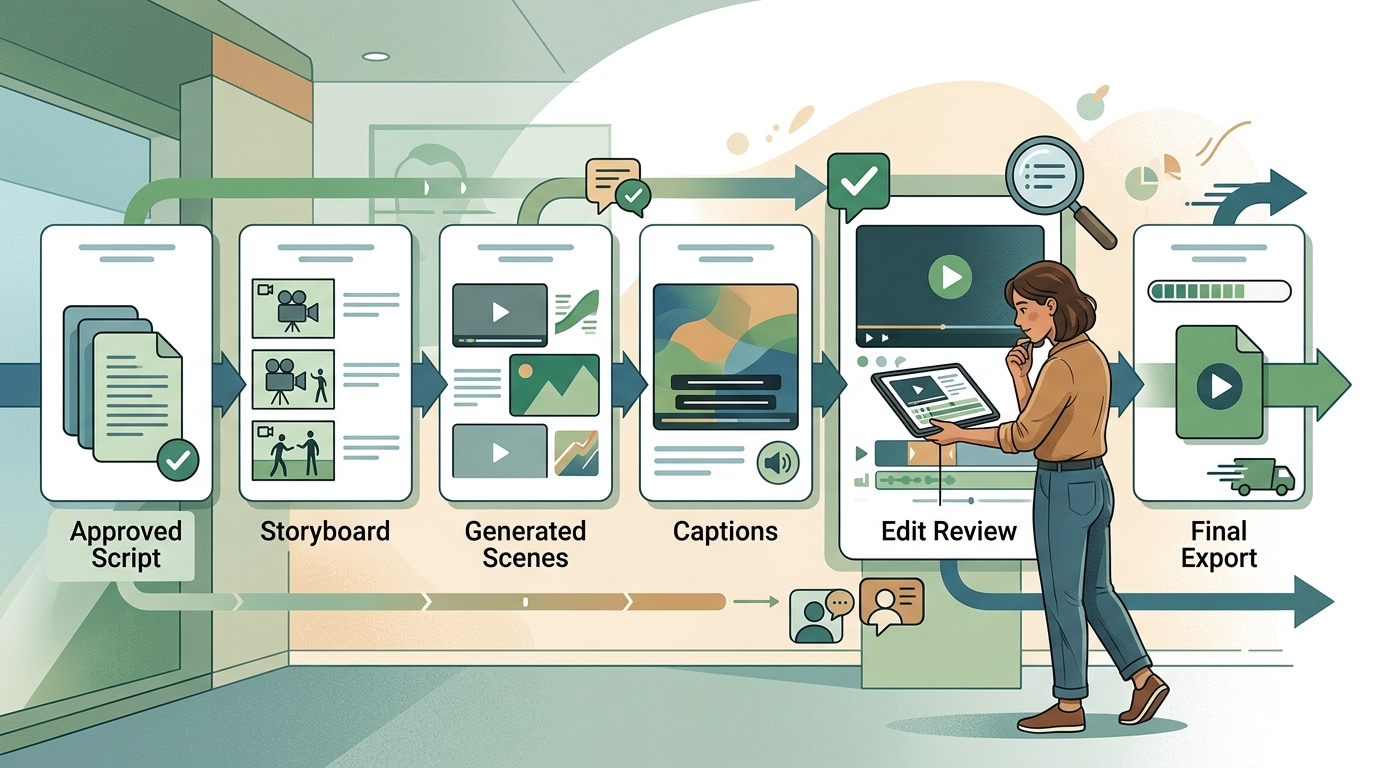
AI video tools serve different production needs. Some focus on avatars, while others support faceless video or place video creation inside a broader marketing workflow.
HeyGen is associated with AI avatars and generated presenters. Syllaby is often considered for script-to-video and faceless content workflows. These tools may be useful when their central format fits the job. A company producing training presentations will have different requirements from a creator publishing educational clips several times a week.
Evaluate the complete workflow, not just the first generated result.
Test the input process
Can the tool use an approved script, brand language, visual assets, and preferred format? If each project requires rebuilding context, a fast render may not save much time.
Inspect the editability
Generated visuals, pacing, pronunciation, and captions may need correction. Confirm that you can replace scenes, edit text, adjust timing, and fix errors without restarting the project.
Check output flexibility
Identify the aspect ratios, resolutions, caption formats, and export options your channels actually require. Avoid paying for flexibility that will not be used.
Review usage limits and pricing mechanics
Video platforms may use subscriptions, credits, generation limits, or combinations of these. Pricing changes, so estimate cost using expected video length and publishing frequency instead of relying only on a headline plan price.
Confirm approval and ownership controls
Determine who can review drafts, who can publish, and how generated assets are stored. For a team, clear approval roles are often more valuable than another generation feature.
Repurpose by channel instead of duplicating the same post
Repurposing should preserve the core idea while changing its presentation for the channel.
Suppose a founder records a 60-second video explaining why customer interviews should happen before a product launch. That source could become:
- A blog section covering the interview process in more depth
- A LinkedIn post focused on a common planning mistake
- A short email containing five interview questions
- A carousel that turns the process into sequential steps
- A follow-up video answering an objection from the comments
These assets should not be identical. Each channel has different viewing behavior, formatting constraints, and audience expectations.
Use AI to create a first adaptation, then review the hook, length, examples, formatting, and call to action for that channel. Remove references that only made sense in the original format. When the source is substantial, AI blog creation can be one part of the repurposing process rather than a replacement for the original idea.
What should be automated?
The best early candidates are repeatable, reversible, and easy to inspect.
Useful examples include:
- Organizing research notes
- Producing first-draft outlines
- Suggesting headline variations
- Turning an approved article into draft social posts
- Creating caption files
- Resizing or reformatting approved assets
- Preparing content for a scheduling queue
- Summarizing performance data for human review
Use more caution when an error could mislead customers, damage trust, create legal exposure, or trigger an expensive action.
Keep a person responsible for:
- Approving factual and numerical claims
- Setting brand positioning
- Responding to sensitive customer situations
- Making legal, medical, tax, or financial assertions
- Approving testimonials and endorsements
- Reviewing sponsorship or synthetic-media disclosures
- Authorizing final publication of consequential content
A useful operating rule is to automate preparation before judgment. Let the system assemble options, drafts, and summaries. Let an accountable person choose what goes live.
Point solutions versus an integrated content platform
There is no universally correct software stack. The right choice depends on the type and frequency of work.
Choose a specialist tool when:
- One format dominates your strategy
- You need advanced controls for a particular production method
- A dedicated team member can manage the additional workflow
- The specialist output is materially better for your use case
An avatar-focused platform may suit a company producing presenter-led training. A faceless video generator may suit a creator who does not want to record on camera.
Choose an integrated workflow when:
- One person handles research, creation, and publishing
- Context is repeatedly copied between applications
- Assets and approvals are difficult to track
- Performance insights do not influence the next content cycle
- Tool management is taking time away from editorial work
HeyCatch represents a different kind of specialist product, focused on finding and supporting organic conversations rather than serving as a complete multimedia production system. That may help a founder prioritizing community participation, but it addresses a different problem from video creation and publishing.
MG Social Studio is designed around a connected workflow for research, short-form video, blog creation, publishing, and Growth Copilot recommendations. Its practical role is to keep more context in one workspace while leaving review and approval with the user. Teams should still compare the workflow against their own requirements, integrations, permissions, and usage limits.
Use a human approval gate before publishing
Every automated workflow needs a clear point where a person takes responsibility for the output.
A lightweight checklist can catch many avoidable errors:
- Are important facts supported by reliable sources?
- Are names, dates, prices, and links correct?
- Does the content match the intended audience?
- Does it sound like the brand rather than a generic template?
- Are examples presented honestly?
- Are sponsorships, endorsements, or synthetic elements disclosed when required?
- Is the call to action relevant to the content?
- Has someone watched or read the final exported version?
Review the finished asset, not only the script. Video generation and formatting can introduce mistakes after written copy has been approved. MG Social Studio's content publishing workflows can support this kind of review process, but a tool does not replace the person who approves publication.
Build a learning loop instead of chasing volume
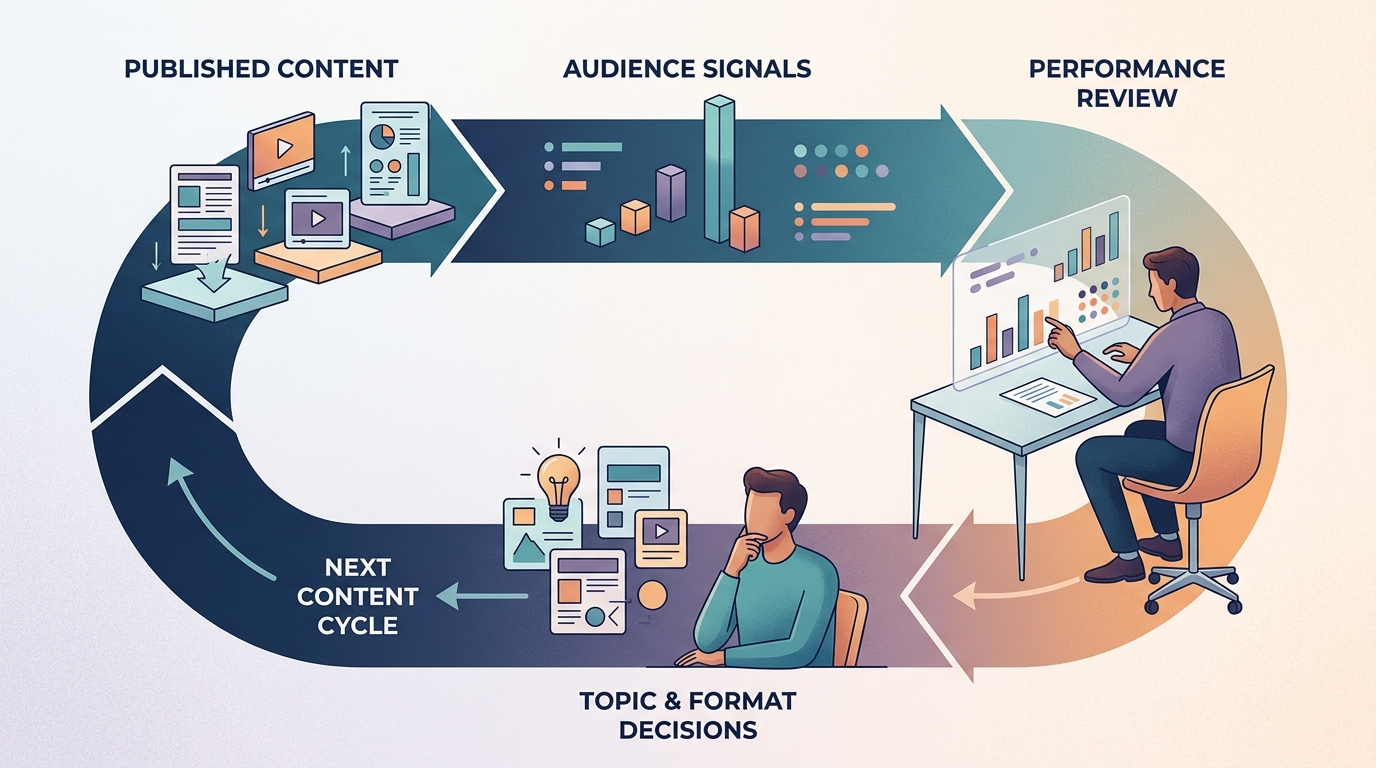
A content system should help you decide what to do next. Choose a small set of metrics connected to the original objective.
For awareness content, you might watch qualified reach, video retention, or profile visits. Educational content may be better evaluated through saves, replies, return visits, or clicks to a deeper resource. Conversion-oriented content should be connected to actions such as inquiries, registrations, or product-page visits.
Avoid judging the entire strategy from one post. Results vary with topic, format, timing, distribution, audience fit, and other factors. Look for patterns across a useful sample.
A simple review process is enough:
- Identify topics that attracted the intended audience.
- Compare the opening, format, and depth of stronger and weaker posts.
- Record audience questions and objections.
- Decide what to repeat, revise, or stop.
- Feed those decisions into the next research and creation cycle.
AI can summarize data and surface possible patterns. Treat its recommendations as hypotheses to inspect, not instructions that must be followed. Growth Copilot recommendations are most useful when they inform this review rather than bypass it.
A 30-day implementation plan
Week 1: Map the current process
List every tool, handoff, approval, and repeated manual step involved in publishing one piece of content. Note where information is copied, lost, or recreated.
Week 2: Build one repeatable workflow
Choose one audience, one content theme, and one primary format. Create a brief, source template, approval checklist, and publishing process.
Week 3: Add selective automation
Automate one or two low-risk steps, such as first-draft repurposing or caption preparation. Avoid automating the entire pipeline at once because failures become harder to diagnose.
Week 4: Review quality and effort
Measure more than output volume. Track the time required, the number of corrections, publishing consistency, and whether the intended audience responds.
Keep automation that removes useful work. Revise or remove anything that creates additional cleanup.
Questions to ask before choosing an AI marketing platform
Use these questions during product demonstrations and trials:
- Can the platform support research, creation, approval, and publishing, or only one stage?
- Can users edit every generated element before publication?
- Can the system preserve brand instructions and approved source material?
- How are collaborators, permissions, and approvals handled?
- Which channels and media formats are supported?
- What usage limits apply to video, storage, exports, and scheduled posts?
- Can performance information influence future recommendations?
- How easy is it to export content and data?
- Which steps still require another tool?
- What happens when an integration or social connection fails?
The answers should match your real publishing process, not an idealized feature list.
Frequently asked questions
Can AI fully automate social media for a small business?
Some systems can generate, schedule, and publish content with limited intervention. That does not make full autonomy the best operating model. Small businesses should retain human review for factual accuracy, brand judgment, disclosures, sensitive responses, and final approval.
Will AI-generated content automatically improve reach?
No. AI can reduce production effort and help a team test ideas more consistently, but it cannot guarantee reach, rankings, engagement, customers, or revenue. Topic relevance, originality, execution, distribution, and audience response still matter.
How many AI marketing tools does a small business need?
There is no fixed number. Use the smallest stack that supports the complete workflow at an acceptable quality level. A specialist tool can be worthwhile when it provides an important capability. Consolidation makes sense when moving information between tools causes delays, duplicated work, or lost context.
What is the best content to create first?
Start with a recurring customer question that is relevant to an actual product or service. It provides a clear audience, a useful purpose, and a natural basis for a video, article, email, or social post.
How should a business measure AI content ROI?
Track production cost and effort alongside business-relevant results. Useful measures can include production time, correction rate, publishing consistency, qualified website visits, inquiries, or conversions. Choose metrics that match the content's original purpose.
Build a system that keeps people in control
The strongest reason to use AI is not to fill every channel with more material. It is to make a disciplined content process manageable for a small team.
Connect research to creation. Turn approved source material into channel-specific assets. Add an explicit review gate. Then use audience response to guide the next cycle.
Start creating with MG Social Studio to bring short-form video, blog creation, research, publishing workflows, and Growth Copilot recommendations into a more connected workspace.
Results vary. AI-generated recommendations and content should be reviewed before publishing.