
Paid social video
AI Video Ads vs. Creator UGC: Cost, Workflow, and Best Use Cases
AI video ads offer fast, inexpensive creative variation, while creator UGC provides stronger human proof and product credibility. Compare the real costs, workflows, risks, and use cases before choosing one or combining both.
By MillsGuild Editorial ·

AI Video Ads vs. Creator UGC: Cost, Workflow, and Best Use Cases
AI video ads and creator UGC solve different creative problems. Choose AI when a campaign needs fast exploration, efficient variations, or supporting visuals. Choose creator footage when the audience needs to see a product handled, hear a genuine experience, or assess the person behind a recommendation.
AI-assisted production can help a small team explore hooks, adapt scripts, create supporting visuals, and prepare alternate versions. Creator footage is often more useful when the audience needs to see a product handled, hear a genuine experience, or assess the person behind a recommendation.
The cost calculation depends on the finished asset, not the first render. A cheap generation may require several failed renders, extensive editing, fact-checking, or compliance review. A creator video may cost more at the start, but one session can produce demonstrations, reactions, hooks, and cutdowns for several placements.
For many teams, the practical answer is a workflow that uses each method for the part it can perform well. AI can help narrow the message. A real creator can provide proof where proof matters.
First, clarify what creator UGC means
UGC originally referred to content voluntarily posted by customers. In advertising, creator UGC commonly means content commissioned from a creator and made to resemble an informal customer video.
That distinction matters. A paid creator reading a brief is not necessarily an independent customer, and an AI avatar has no product experience. Neither should be presented as an unpaid testimonial when that is not true.
In this comparison:
- AI video ads include generated scenes, synthetic presenters, AI voices, animated product imagery, or videos assembled substantially with generative tools.
- Creator UGC means footage produced by a real person under a commercial agreement, usually in a conversational, platform-native style.
- Customer UGC means content created by actual customers, whether solicited or unsolicited. Its permissions and disclosure requirements are a separate issue.
AI video ads vs. creator UGC at a glance
| Decision factor | AI video ads | Creator UGC |
|---|---|---|
| Production speed | Fast after scripts, prompts, and templates are prepared | Slower because of casting, briefing, shipping, filming, and revisions |
| Cost structure | Software, credits, editing time, failed renders, and review | Creator fee, product, shipping, usage rights, revisions, and coordination |
| Creative variation | Easy to change hooks, scripts, languages, backgrounds, and calls to action | Limited by the footage captured, although one shoot can support multiple edits |
| Human credibility | Limited when the presenter appears to imply personal experience | Stronger when the creator can genuinely demonstrate or discuss the product |
| Physical demonstration | Requires careful checking because generated details may be wrong | Better for texture, fit, setup, packaging, and real-world use |
| Brand control | High in principle, but every output still needs inspection | Depends on the brief, creator, approval process, and contract |
| Compliance work | Synthetic-media labels and accurate representation require review | Contracts, advertising disclosures, and truthful testimonial language require review |
| Useful role | Concept exploration, explainers, localization, supporting visuals, and variations | Testimonials, demonstrations, founder messages, and trust-sensitive offers |
The table is a starting point rather than a performance prediction. Results depend on the product, audience, message, placement, and quality of execution.
Compare the cost of an approved asset
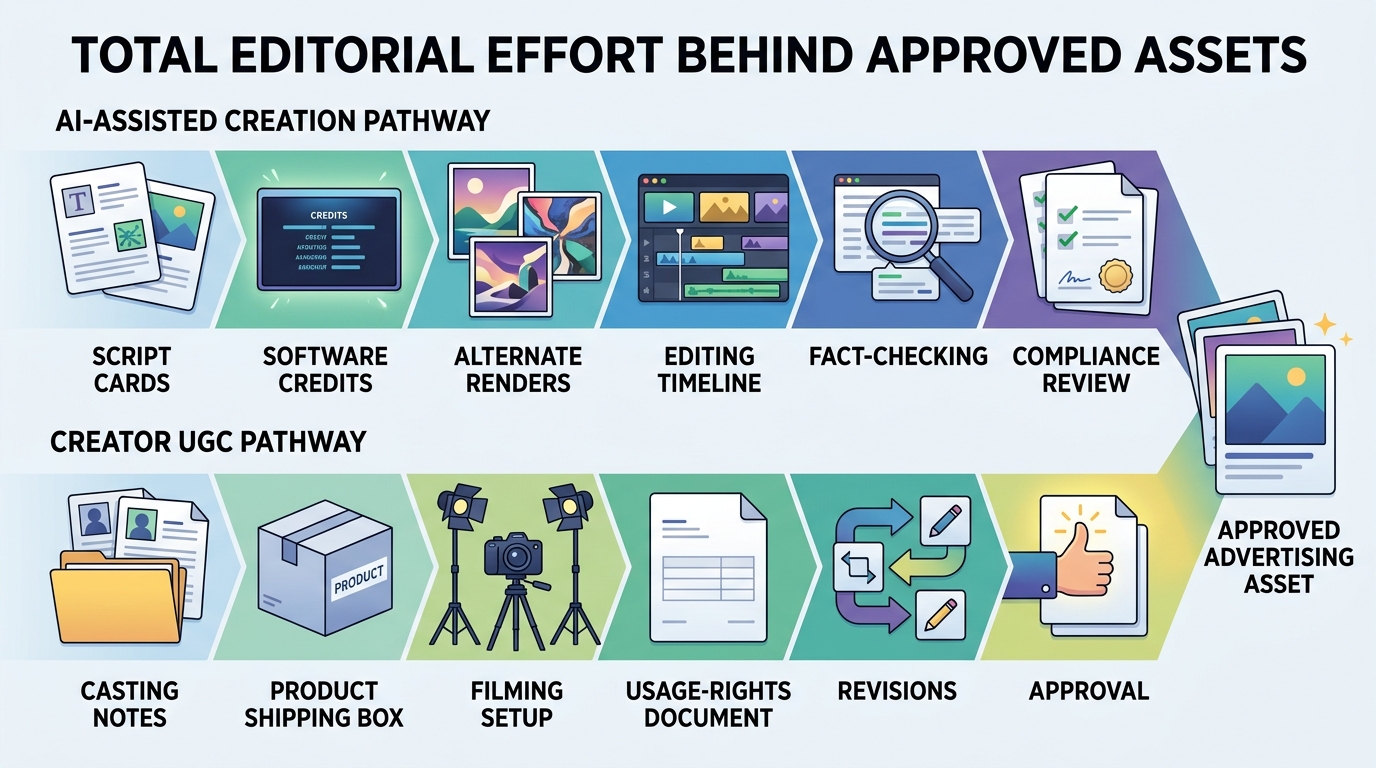
Compare the total cost of an approved asset that the business can legally publish and reuse, not a creator's fee against the price of one AI render.
AI video costs
An AI video budget may include the campaign's share of a software subscription, additional generation credits, script and prompt development, failed renders, editing, captions, music, resizing, translation review, product-accuracy checks, disclosure checks, publishing, and analysis.
A render with a distorted product, incorrect interface, unnatural voice, or unsupported claim has little practical value. The generation may have been inexpensive, but the usable asset is not.
Creator UGC costs
A creator quote should specify the filming fee, product and shipping costs, number of concepts and edits, revision allowance, delivery schedule, and usage rights. It should also address raw footage, paid advertising, duration of use, permitted channels, and exclusivity.
Usage rights are especially important. Paying for filming does not automatically determine where the footage may run, how long it may be used, or whether the brand may make new edits from the source material.
Use the same measures for both approaches:
Cost per approved asset = total campaign production cost / number of assets approved for publication
Cost per tested concept = total campaign production cost / number of meaningfully different concepts tested
A meaningful variation changes the hook, audience problem, proof mechanism, offer, or call to action. A different caption color or nearly identical background is not a new concept.
The workflows place effort in different places
AI work concentrates effort in briefing, generation, selection, editing, and quality control. Creator work concentrates effort in casting, coordination, rights management, filming, and revisions.
A practical AI video workflow
Begin with a creative hypothesis. Decide what the video is meant to test, such as a time-saving angle for busy consultants or a setup demonstration for first-time buyers. Without a hypothesis, rapid generation can produce many cosmetic variations without producing useful learning.
Next, create a factual source sheet containing the product name, verified features, approved benefits, offer terms, prohibited claims, required disclosures, pronunciation, and brand terminology. Do not ask a model to infer important product details from a short prompt.
Write modular scripts with separate hooks, problems, demonstrations, proof points, offers, and calls to action. This makes it possible to test one decision while keeping the rest of the message stable.
Choose the least risky production method for the material. An avatar may work for a straightforward explanation. A screen recording is usually more appropriate for software interfaces. Real footage is safer when a physical product must look and behave precisely as it does in real life. AI can still assist with storyboards, captions, voice cleanup, translations, resizing, or alternate edits around verified footage.
After generating and editing, inspect the export for product shape and labels, on-screen text, hands and faces, object interactions, pronunciation, lip synchronization, interface accuracy, prices, offer terms, music permissions, and required disclosures. Watch the finished file on a phone with sound on and off.
Publish controlled tests linked to documented hypotheses. Record the audience, placement, hook, offer, production method, publication date, and result. Views alone are not enough to establish value. The relevant measure may be qualified watch behavior, a landing-page action, or a completed purchase, depending on the campaign.
A practical creator UGC workflow
Start by defining the communication style and product fit you need. Follower count may be irrelevant if the creator is supplying footage for the brand rather than distributing it through a personal account.
The brief should explain the intended viewer, the problem, verified product facts, required demonstrations, deliverables, aspect ratios, deadlines, revisions, disclosure responsibilities, and permitted uses. Settle paid advertising rights and raw-footage access before shipping the product.
Give the creator accurate talking points without forcing every sentence unless wording is legally sensitive. Natural delivery is part of the format's appeal. For a physical demonstration, identify the moments the audience needs to see, such as opening the package, fitting a component, navigating a control, comparing size, or cleaning up after use.
Review claims as carefully as visuals. A real person can still make an inaccurate claim. Confirm that personal-experience statements are true, material relationships are disclosed, and the edit preserves the meaning of the creator's words.
Plan the shoot around the edits you need. One session may provide several hooks, demonstrations, reaction shots, cutdowns, and calls to action, but only if those moments are requested in advance and covered by the agreement.
Where AI video ads fit best
AI-assisted video is particularly useful during concept exploration. A team can draft hooks, storyboards, rough edits, synthetic presenter versions, or supporting visuals before committing to a larger shoot. A rough concept may be valuable internally even when it is not suitable for public release.
Service and software companies can also use AI-assisted graphics, narration, captions, and verified screen recordings to explain an invisible process. Generated interface demonstrations should be avoided when accuracy matters. Current product captures are safer.
Localization is another useful application. AI can accelerate translated scripts, voice drafts, captions, and alternate versions, but a fluent reviewer should check meaning, pronunciation, cultural context, and offer terms.
Template-based video can suit short-lived announcements, event reminders, schedule changes, and simple promotions. The details should be checked immediately before publication.
AI can also support a human-led ad without replacing the human subject. Captioning, cleanup, background treatment, supporting graphics, resizing, and cutdown suggestions can reduce post-production work around approved footage.
Where creator UGC is usually the safer choice
Creator footage is valuable when buyers need physical proof. Texture, scale, fit, assembly, packaging, movement, and before-and-after processes are difficult to represent reliably with generated visuals.
It is also the appropriate choice when the message depends on personal experience. An AI avatar cannot truthfully say that it tried a product or describe what happened while using it. The Federal Trade Commission's AI enforcement activity reinforces the basic principle that AI does not remove ordinary truth-in-advertising obligations.
Human involvement can be important for trust-sensitive purchases, including professional services, financial products, health-related products, and expensive goods. A real face does not make a claim accurate, but the person's role, experience, and demonstration can be evaluated.
Founder updates, apologies, policy explanations, and community responses may also need to come from the actual person responsible. A synthetic stand-in can weaken a message whose purpose is accountability.
A hybrid workflow can reduce wasted production
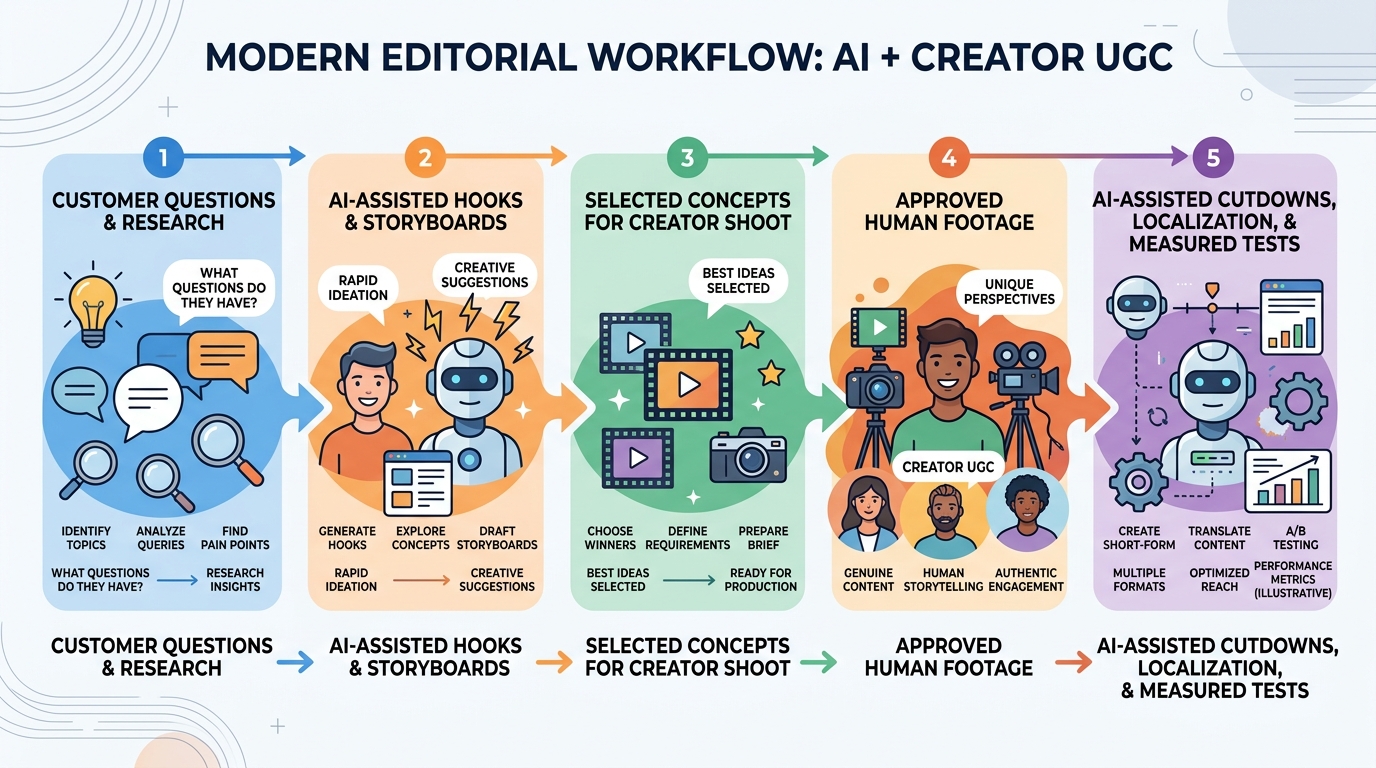
A hybrid approach is most useful when AI and creators are assigned different jobs rather than asked to imitate each other.
A team might begin with customer questions and research, then use AI assistance to draft hooks, scripts, and storyboards. After checking those concepts against an approved fact sheet, it can select a smaller group for creator production. The creator supplies real demonstrations and natural delivery. AI-assisted editing then prepares cutdowns, captions, translations, and platform-specific versions around that approved material.
The resulting tests should be documented and measured. Their findings can shape the next brief, making the process a learning loop rather than a race to produce the largest folder of videos.
Platform disclosure is not the same as a performance penalty
Platform policies describe disclosure and labeling requirements, not a universal CPM or reach penalty for every synthetic video.
Official guidance does establish disclosure requirements for some realistic altered or synthetic media:
- TikTok's AI-generated content guidance explains when realistic AI-generated or significantly edited content should be labeled.
- YouTube's altered or synthetic content policy requires disclosure for realistic content that viewers could mistake for an actual person, place, scene, or event.
- Meta's labeling approach describes labels based on industry signals and user disclosure for AI-generated or manipulated media.
Policies and enforcement practices can change. Check the current rules for each platform and market when preparing a campaign.
A disclosure also does not cure deception. Labeling a synthetic testimonial does not make a fabricated customer experience truthful.
Review the asset before publishing
Use one review process for AI-assisted and creator-produced ads.
Accuracy and identity
Confirm that features, limitations, prices, dates, offers, demonstrations, and objective claims are correct. Check that every real person's image and voice are used with permission. Consider whether an actor or avatar could be mistaken for an actual customer, employee, or expert.
Commercial disclosure
Confirm that a creator's material relationship is disclosed where required and that realistic AI-generated or altered content is labeled according to the platform's current rules. The disclosure should be visible and understandable in the final placement.
Rights and quality
Check permissions for footage, music, voices, images, and product assets. Confirm that creator agreements and software terms cover the intended channels, usage period, and derivative edits. Finally, watch the export from beginning to end, review captions and spoken claims separately, check the mobile version, and approve the destination link.
How to choose between AI video and creator UGC
Choose an AI-first process when the message can be communicated without personal experience, the team needs many variations, and product details can be checked accurately. Explainers, announcements, localization drafts, supporting visuals, and internal concept tests are common examples.
Choose creator-first production when the product must be handled, personal experience is central, trust is a major barrier, or the creator's point of view is part of the value. Make the rights and deliverables explicit before filming.
Use a hybrid workflow when you want faster research and scripting but still need human proof, or when a creator shoot is expensive enough that concepts should be narrowed first. It is also useful when a small amount of approved footage needs to become many measured edits.
Run a pilot before changing the whole process
A small pilot will reveal more than a broad claim about which format always performs better. Use one product, one audience, one offer, and a limited set of genuinely different messages. Keep the landing page and measurement approach consistent, and record internal labor as well as direct production expense.
Track the concept, hook, production method, time to approved export, revisions or regenerations, total production cost, placement, audience, relevant viewing behavior, landing-page action, conversion outcome when measurable, and compliance issues.
Use the pilot to find the least wasteful way to produce credible creative for a particular product and audience. The right choice depends on what the campaign needs to demonstrate and learn.
Build the workflow around learning
More videos are not automatically better. Each asset should test a defined idea, make claims the business can support, and produce information that improves the next brief.
That becomes difficult when research, scripts, renders, editing, approvals, scheduling, and measurement are scattered across separate tools. Campaign context can disappear between files and accounts, and repetitive coordination can consume time that should go toward creative decisions.
MG Social Studio is designed to connect AI-assisted research, short-form content creation, publishing workflows, and Growth Copilot recommendations while keeping the user involved in review and approval. For a lean team, that can make the workflow easier to follow from initial question to published test and next decision.
Start creating with MG Social Studio.
AI-generated recommendations and content should be reviewed before publishing.
Frequently asked questions
Are AI video ads cheaper than creator UGC?
They can have a lower marginal production cost, especially when adapting scripts or preparing variations. The fair comparison includes subscriptions, credits, failed generations, editing, review, creator rights, shipping, revisions, and internal labor. Measure the cost per approved asset and the cost per tested concept.
Can an AI avatar give a product testimonial?
An avatar can present verified product information, but it cannot truthfully claim personal experience. Do not script a synthetic presenter as a satisfied customer when that would mislead the audience.
Does AI-generated video have to be labeled?
Sometimes. TikTok, YouTube, and Meta have disclosure or labeling systems for certain realistic AI-generated and altered media. Requirements depend on the content and platform, so review current policies before publishing.
Is creator UGC always more authentic?
No. Creator UGC may be commissioned, scripted, and edited by a brand. It includes a real human subject, but the commercial relationship and the creator's actual experience still matter. A handheld visual style alone does not establish authenticity.
What should a small business test first?
Start with the largest uncertainty in the buying decision. If customers do not understand the product, test a clear explainer. If they doubt that it works in real conditions, prioritize a real demonstration. If the strongest problem or hook is unclear, use AI-assisted concept development before funding a larger creator shoot.
Sources
Sources
- https://www.ftc.gov/news-events/news/press-releases/2024/09/ftc-announces-crackdown-deceptive-ai-claims-schemes
- https://support.tiktok.com/en/using-tiktok/creating-videos/ai-generated-content
- https://support.google.com/youtube/answer/14328491
- https://about.fb.com/news/2024/04/metas-approach-to-labeling-ai-generated-content-and-manipulated-media/