
SEO maintenance
How to Audit and Reverse Content Decay Using Google Search Console
A practical workflow for finding declining pages in Google Search Console, diagnosing why they lost traffic, and deciding whether to refresh, consolidate, redirect, or leave them alone.
By MillsGuild Editorial ·

How to Audit and Reverse Content Decay Using Google Search Console
A page that loses organic traffic may need a rewrite. It may also be ranking lower, attracting fewer searches, appearing for a different mix of queries, or losing clicks because the search results have changed. A technical problem can create a similar chart for a completely different reason.
Content decay is therefore a diagnostic problem before it becomes an editing task.
Google Search Console provides the page, query, click, impression, click-through rate, and average-position data needed to investigate. It does not identify the cause for you, but a careful comparison can narrow the possibilities and keep you from refreshing the wrong pages.
This guide explains how to make that comparison, interpret the patterns, and choose a proportionate response. It also shows where AI video and social automation can support the work without treating either as a guaranteed ranking fix.
What counts as content decay?
Content decay is a sustained decline in a page's organic search performance after it previously attracted meaningful visibility or traffic.
The word sustained matters. A bad week is not enough. Search traffic can fluctuate because of seasonality, holidays, news cycles, changing demand, reporting delays, or ordinary differences between weekdays and weekends.
Content decay also differs from a sudden sitewide collapse. Google recommends checking for technical problems, security issues, manual actions, algorithmic changes, seasonality, and reporting glitches when diagnosing a search traffic drop. Its documentation shows how different causes can produce recognizably different chart shapes (Google Search Central).
A useful working definition is:
A page is a decay candidate when its search clicks or visibility decline across comparable periods, and the decline cannot be explained adequately by seasonality, sitewide problems, or lower demand alone.
Start with comparable date ranges
Open Search Console > Performance > Search results and enable all four metrics:
- Total clicks
- Total impressions
- Average CTR
- Average position
Search Console's performance report supports date comparisons and provides up to 16 months of data. It also lets you group and filter results by page, query, country, device, and search appearance (Google's guide to debugging Search traffic drops).
Choose a comparison that matches the question you are asking:
- Recent movement: Last 28 days versus the previous 28 days
- More stable movement: Last three months versus the previous three months
- Seasonal movement: A recent period versus the equivalent period one year earlier
Year-over-year data is usually safer for seasonal subjects. A tax guide, holiday campaign, gardening tutorial, or annual software roundup may look unhealthy against the immediately preceding period even though it is following its normal demand cycle.
Use more than one comparison when possible. A page that is down year over year and across recent three-month periods deserves more attention than one that looks weak in a single short window.
Identify pages losing meaningful clicks
Open the Pages tab beneath the chart and sort by the difference in clicks so the largest losses appear first.
This creates a review list, not an automatic rewrite queue. Absolute loss and percentage loss answer different questions:
- A page falling from 10,000 clicks to 8,000 lost substantial traffic but may still be healthy.
- A page falling from 100 clicks to 20 suffered a steeper percentage decline but may have limited business value.
- A page losing only 30 visits may still matter if it supports a high-value product or lead-generation journey.
Build a working sheet with these columns:
| Field | Why it matters |
|---|---|
| URL | Identifies the page being reviewed |
| Previous clicks | Establishes the baseline |
| Current clicks | Shows current performance |
| Click difference | Helps prioritize total traffic loss |
| Percentage change | Reveals severity relative to page size |
| Impression change | Helps separate visibility from CTR problems |
| Position change | Indicates possible ranking movement |
| Conversion or business role | Prevents traffic alone from setting priorities |
| Proposed action | Creates an accountable refresh queue |
Small sites can export the filtered report manually. Larger sites may need the Search Analytics API to retrieve and store more granular data. Google's API supports grouping and filtering by dimensions such as query, page, country, device, date, and search appearance (Search Analytics API).
Read the metric pattern before editing
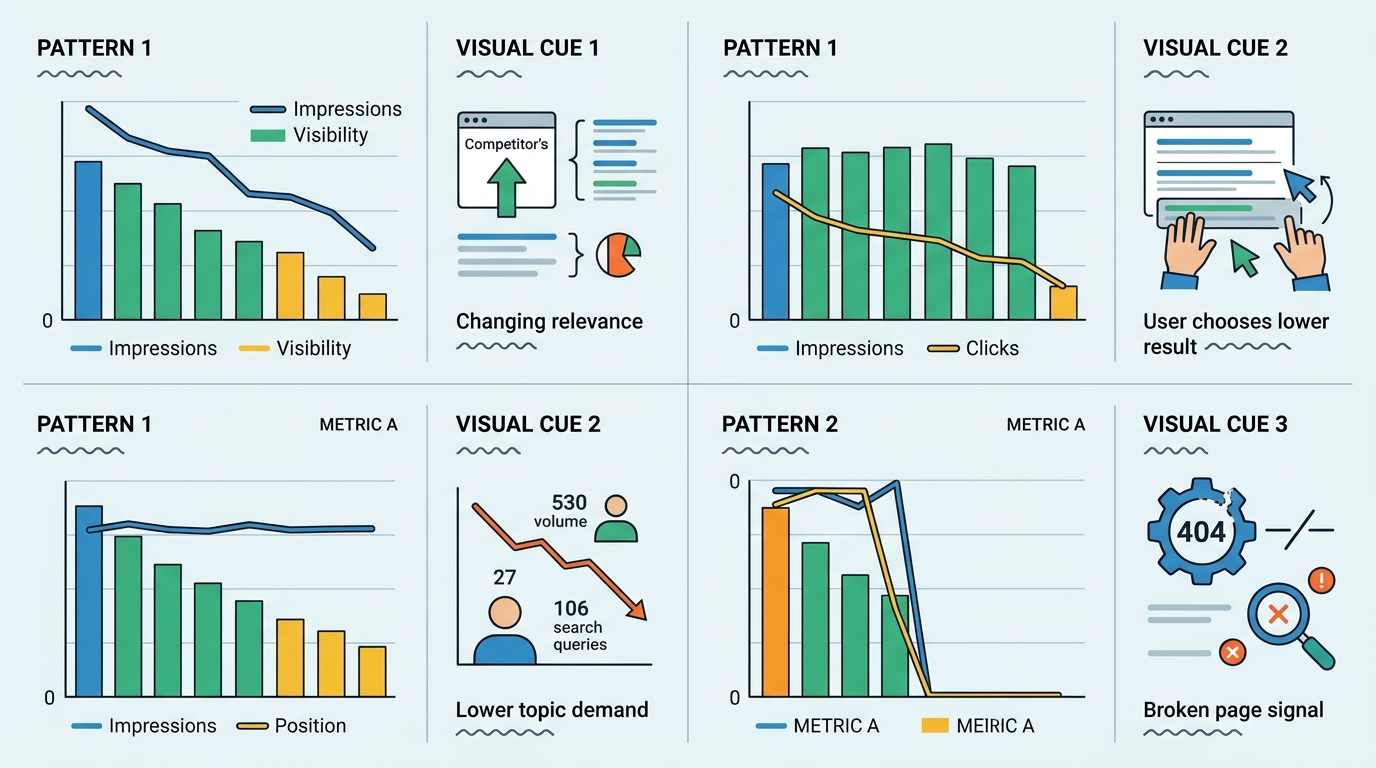
Clicks show the outcome, not the cause. Compare all four metrics, then inspect the queries attached to the affected URL.
| Pattern | Possible explanations | What to investigate |
|---|---|---|
| Clicks down, impressions down, position down | Ranking loss, weaker relevance, stronger competing results, or a technical issue | Query-level losses, current results, internal links, indexing, content accuracy |
| Clicks down, impressions stable, position stable | Lower CTR, a changed query mix, or a different search-results layout | Titles, snippets, devices, countries, search features, affected queries |
| Clicks and impressions down, position stable | Lower demand, seasonality, or loss of peripheral queries | Year-over-year data and topic demand |
| Position changes sharply while other metrics vary | Query mix may have changed, or rankings may have declined | Individual queries rather than the page average |
| Clicks and impressions fall suddenly toward zero | Indexing, canonical, robots, server, migration, or removal issue | URL Inspection, page status, manual actions, security and deployment history |
Average position needs careful handling. It is an aggregate based on the topmost result from your property for each search. A page can lose a group of low-ranking queries and show an improved average position while receiving fewer clicks. It can also begin appearing for many new queries at low positions and show a worse average even when valuable rankings remain steady. Google documents these interpretation limits in its performance report guide.
Stable position and changing search results
If clicks decline while impressions and average position remain steady, a changed search-results page is one possible explanation. That might involve an AI Overview, a featured result, video results, shopping features, local results, or another element that changes where people click.
Search Console's standard page and query metrics cannot prove that a particular feature caused the decline. Treat AI displacement as a hypothesis to investigate rather than a diagnosis produced by the chart.
Check the actual results for representative queries, ideally across the locations and devices important to your audience. Search results are personalized and change over time, so a manual spot check is useful evidence but not a complete historical record.
Inspect the queries behind each page
Click a declining URL in the Pages report. Search Console will apply that URL as a filter. Move to the Queries tab and sort by click or impression difference.
This turns a broad instruction such as “update the article” into a more useful editorial brief.
Suppose a guide about AI video software lost most of its traffic from queries containing pricing, free, and alternatives. The page may need current plan information, clearer limitations, a comparison table, and an explanation of who should choose each type of tool. It may not need a complete rewrite.
If losses cluster around how-to queries, the instructional section may be too vague or out of step with the current interface. Screenshots, a screen recording, or a short demonstration could be more useful than another 500 words.
Useful GSC regex filters
Search Console supports regular-expression filters based on RE2 syntax. Google notes that some expressions, including unsupported syntax, may not work as expected, so test filters against visible examples (Google Search Central).
Try filters such as:
| Goal | Example pattern |
|---|---|
| Find question-led searches | ^(who|what|when|where|why|how|can|does|is|are) |
| Isolate comparison intent | (vs|versus|comparison|alternative|alternatives) |
| Find searches containing a year | (2024|2025|2026) |
| Isolate a blog directory in the Pages report | ^https://www.example.com/blog/ |
Regex filters are segmentation tools. Their purpose is to expose clusters that would be hidden inside an aggregate total, not to establish why a page declined.
Check for technical and sitewide causes
Before changing the copy, inspect the page with Search Console's URL Inspection tool and verify that:
- The URL can be indexed
- Google selected the expected canonical URL
- The page still returns the intended status code
- A robots directive is not blocking it
- Important content is present in the rendered page
- The URL was not accidentally removed during a redesign or migration
Then look at the site's overall performance chart. If many unrelated directories dropped at the same time, the issue probably is not ordinary page-level decay. Review release notes, migrations, template changes, manual actions, security notices, and the timing of public Google Search updates. Google's traffic-drop documentation recommends separating technical, algorithmic, seasonal, and reporting causes before deciding on a response (Google Search Central).
Match the treatment to the diagnosis
A useful audit ends with a decision, rather than a long list of declining URLs.
Refresh the page
Refresh a page when the subject still has value and the existing URL serves the correct search intent.
A substantive refresh may include:
- Correcting obsolete facts, screenshots, workflows, or product information
- Replacing unsupported claims with primary evidence
- Answering query clusters the page has begun losing
- Removing sections that no longer help the reader
- Improving the title and description when visibility is stable but CTR has weakened
- Adding relevant internal links from newer pages
- Making the primary answer easier to find
Changing the displayed publication date without making meaningful improvements does not solve an accuracy or intent problem. Google's guidance emphasizes people-first content that provides original value and a satisfying answer, rather than changes made mainly to attract search visits (Google Search Central).
Consolidate overlapping pages
Consolidate when several URLs address the same intent and none provides a clearly distinct purpose.
Choose the strongest URL, merge useful material into it, update internal links, and redirect retired URLs to the closest relevant destination. Google recommends permanent server-side redirects such as 301 or 308 when a URL has permanently moved (Google Search Central).
Do not redirect every deleted post to the homepage. The destination should be a genuine replacement for the old page.
Remove or retire the page
Removal can be appropriate when information is obsolete, legally unsafe, inaccurate beyond repair, or disconnected from the site's current purpose.
Before deleting, check whether the URL has useful backlinks, conversions, referral traffic, or a relevant replacement. If there is no equivalent page, returning a proper 404 or 410 response can be more honest than forcing an irrelevant redirect.
Leave it alone
Some declines reflect reduced demand rather than a weakness in the page. If rankings remain strong but interest in the subject has contracted, rewriting may not restore traffic. Keep the page accurate if it still helps readers, then put production resources elsewhere.
Add AI video when the page benefits from demonstration
Video earns its place when it makes the explanation easier to follow. Interface walkthroughs, editing demonstrations, visual comparisons, and processes involving movement or timing are often better candidates than text-only explanations.
A practical AI-assisted workflow is:
- Extract the page's verified steps and central argument.
- Draft a short script from those facts.
- Check every generated statement against the refreshed article and original sources.
- Produce the video using screen captures, licensed visuals, an avatar, or generated footage appropriate to the subject.
- Review pronunciation, on-screen text, pacing, accessibility, and brand consistency.
- Embed the video only if it adds information or makes the task easier to understand.
The video should address the weakness found in the audit. A pricing comparison might benefit from a guided plan review. A software tutorial might need a current screen recording. A general article with no visual component may gain little from an automatically generated summary.
AI-generated pricing, interface instructions, and tool comparisons require human verification because those details can change quickly. A video can support a refresh, but it cannot substitute for accurate information, a sound page experience, or the correct search intent.
Use social automation for distribution and learning
Social distribution can bring a refreshed article back to an existing audience and provide feedback about which framing attracts interest. Referral visits and conversions should be measured separately from organic search recovery.
One manageable workflow is:
- A refreshed article enters an approved content queue.
- An automation tool generates channel-specific draft copy from the final article.
- A person checks claims, tone, links, tags, and media rights.
- Approved posts are scheduled for the relevant networks.
- Referral visits and conversions are measured separately from organic search performance.
The approval step is important. A factual error copied across LinkedIn, Instagram, YouTube, TikTok, and X creates more cleanup than the automation saved.
Use different excerpts rather than publishing the same generic summary everywhere. A short video clip may suit Reels or Shorts, while a comparison chart or decision framework may be more useful on LinkedIn.
Measure the intervention
Record the update date, the reason for the change, and the action taken. Without that log, later comparisons become guesswork.
Monitor the page using the same dimensions you used during diagnosis:
- The affected query cluster
- Clicks and impressions
- CTR and average position
- Device and country, where relevant
- Leads, sales, signups, or assisted conversions outside Search Console
Do not judge the result from a single day's movement. Compare sufficiently broad periods, account for seasonality, and check whether recovery came from the queries you intended to improve.
A rising click total is encouraging, but it is not the only useful outcome. A refreshed page might attract fewer visits while producing more qualified leads. It might also become more accurate and useful without recovering because demand has moved elsewhere. The audit should connect search metrics to the page's actual business role.
FAQ
How much traffic loss counts as content decay?
There is no universal percentage. Look for a sustained decline across comparable periods, then weigh the size of the loss against the page's business value. A small decline on a high-converting page can matter more than a large decline on an obsolete article.
Can changing the publication date reverse content decay?
A date change alone does not fix outdated information, changed intent, weak coverage, or technical problems. Update the displayed date only when the page has received a meaningful and accurate revision.
Should every declining page be refreshed?
No. Some pages are better candidates for consolidation, redirection, removal, or no action. Review demand, backlinks, conversions, technical status, and strategic relevance before investing in a rewrite.
Does adding an AI-generated video improve rankings?
There is no guaranteed ranking outcome. Add video when it makes the page more useful, especially for visual demonstrations. A generic summary video is unlikely to repair a page that is inaccurate, technically broken, or aimed at the wrong intent.
Can Search Console identify traffic lost specifically to AI Overviews?
Its standard performance metrics can reveal patterns consistent with a changed search-results page, such as lower clicks with relatively stable visibility. That pattern does not prove an AI Overview caused the loss. Query review and careful result-page observation can help you investigate the possibility.
Sources
Sources
- https://support.google.com/webmasters/answer/7576553
- https://developers.google.com/search/docs/monitor-debug/debugging-search-traffic-drops
- https://developers.google.com/webmaster-tools/v1/searchanalytics/query
- https://developers.google.com/search/blog/2021/06/regex-negative-match
- https://developers.google.com/search/docs/fundamentals/creating-helpful-content
- https://developers.google.com/search/docs/crawling-indexing/301-redirects