
Topical authority
How to Build an SEO Topical Map Without Expensive Software
Build a practical SEO topical map with Google Search, Search Console, a spreadsheet, and optional AI assistance. This guide covers topic discovery, intent-based clustering, internal links, prioritization, and content repurposing.
By MillsGuild Editorial · · Updated
How to Build an SEO Topical Map Without Expensive Software
You can plan a useful SEO content strategy without an enterprise subscription.
A spreadsheet, Google Search, customer conversations, and a few careful AI prompts are enough to build a strong first topical map. Paid software helps when you need to process thousands of keywords or manage several sites, but it is not required for making sensible decisions about what to publish.
The real work is understanding what your audience wants, which questions belong together, and how each page supports the business. This guide walks through a manual process, shows where AI can help, and explains how to turn the finished map into blog, video, and social content.
What is an SEO topical map?
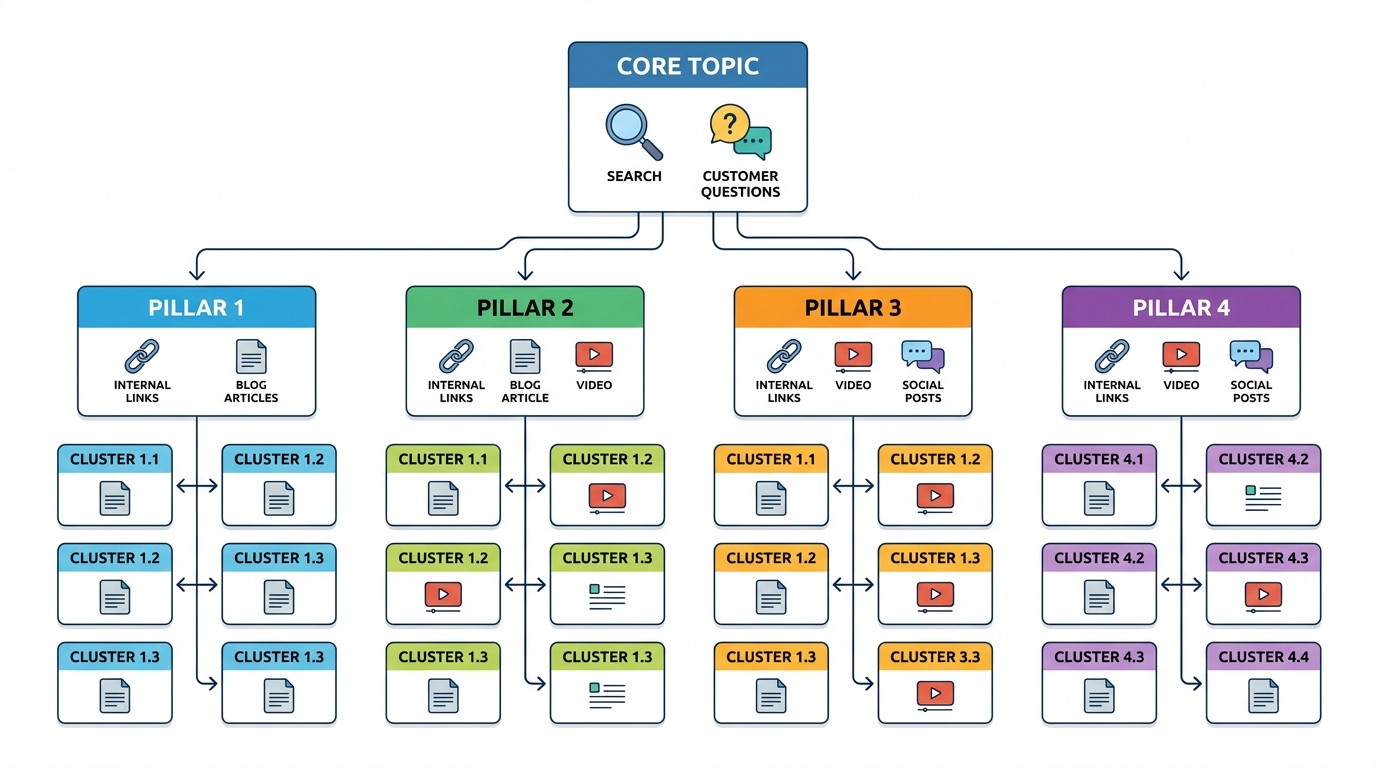
An SEO topical map is a structured plan showing the subjects a website intends to cover and the relationships among them.
A basic map contains three levels:
- Core topic: The broad area closely connected to the business.
- Pillars: Major sections within that area.
- Clusters: Specific questions, tasks, comparisons, and problems related to each pillar.
Suppose a company sells software for creating short-form marketing videos. Its map might look like this:
- Core topic: AI video creation
- Pillar: Planning AI videos
- How to write an AI video brief
- How to choose a short-form video topic
- AI video content calendar template
- Pillar: Producing AI videos
- Script-to-video workflow
- AI voiceover options
- How to add captions to short videos
- Pillar: Publishing and measurement
- When to repurpose a video
- Short-form video metrics to monitor
- How to adapt one video for different platforms
This structure gives every content asset a role. It also makes it easier to connect related pages than a flat keyword list would.
A topical map is an industry planning method, not an official Google scorecard. Google has documented a system called Topic Authority for specialized and local news, but that should not be treated as proof of a universal public topical-authority score for every website. For most businesses, the practical goal is to organize useful pages around related customer needs and make those relationships easy to navigate.
The free tool stack
You can complete the process with tools you may already use:
- Google Sheets or another spreadsheet: Store, filter, and prioritize topics.
- Google Search: Examine autocomplete suggestions, related searches, result formats, and ranking-page overlap.
- Google Search Console: Find queries and pages already generating impressions if your site has enough data.
- Google Keyword Planner: Expand seed ideas and inspect directional demand data. Access may require a Google Ads account, and the figures are estimates rather than exact forecasts.
- Customer records: Sales questions, support tickets, comments, reviews, and community discussions reveal how buyers describe their problems.
- A general-purpose AI assistant: Brainstorm variations, label intent, and propose preliminary groups.
Search Console is most useful for an existing website. It cannot reveal queries for content you have not published, so customer research and manual search-result review remain important for a new site.
Build your topical map step by step
1. Start with the part of the market you can credibly serve
Your core topic should connect to what you sell, who you serve, and what you can explain accurately.
Avoid choosing a category so broad that much of the map has no connection to your offer. A local bookkeeping firm might begin with “bookkeeping for service businesses” rather than “small business.” The narrower scope gives the research a useful boundary.
Before collecting keywords, answer these questions:
- What does the business help customers accomplish?
- Who has that problem?
- What questions arise before and after a purchase?
- Which subjects can the business support with real expertise, examples, or product knowledge?
- Which topics would be irrelevant even if they attracted traffic?
Write a one-sentence scope statement. For example:
We help solo marketers plan, create, repurpose, and publish short-form videos with AI-assisted workflows.
Use that sentence as a filter. If a proposed topic does not help the audience complete one of those tasks, leave it out of the first map.
2. Create a spreadsheet that captures decisions, not just keywords
Make one row for each potential page or primary content asset. These columns are a useful starting point:
| Column | What to record |
|---|---|
| Pillar | The broad category containing the topic |
| Page topic | The central problem or task |
| Primary query | The clearest phrase representing the topic |
| Related queries | Variations that appear to share the same intent |
| Search intent | Informational, commercial, transactional, or navigational |
| Audience stage | Awareness, consideration, decision, or customer education |
| Recommended format | Guide, comparison, landing page, template, video, or FAQ |
| Existing URL | The current page, if one exists |
| Status | Keep, create, update, merge, or remove |
| Parent page | The pillar or hub that should link to this page |
| Internal links | Closely related pages that should be connected |
| Business relevance | High, medium, or low |
| Confidence | Verified in search results, customer-led, or AI suggestion only |
The confidence column deserves special attention. It prevents an AI-generated idea from being treated as if it came from customer evidence or search-result analysis.
3. Collect topics from several evidence sources
Begin with customer language. Review support requests, sales notes, comments, emails, community posts, and questions submitted through forms.
Pay attention to verbs and desired outcomes. Words such as “schedule,” “compare,” “fix,” “create,” and “choose” often reveal more useful opportunities than broad nouns.
Then search your main topic in Google. Record relevant autocomplete suggestions, related searches, recurring questions, and the types of pages appearing in the results. A results page dominated by product pages points to a different intent from one dominated by tutorials.
For an established site, open the Search Console Performance report. Look for:
- Queries receiving impressions but few clicks
- Pages appearing for several related questions
- Queries that do not have a clearly matching page
- Existing pages whose queries indicate a broader or narrower intent than expected
Keyword Planner can expand the list, but estimated volume should not overrule business relevance. A specific query from a likely customer may be more useful than a broad query with little connection to the offer.
Use an AI assistant at the end of this research pass to identify missing questions and wording variations. Its output is a brainstorming list. It may suggest phrases nobody searches for, or treat separate search intents as one group.
A practical prompt is:
Act as a content strategist for a business that helps [audience] achieve [outcome]. Create possible questions and tasks related to [core topic]. Group them under broad pillars. Include informational, comparison, purchase, setup, troubleshooting, and measurement topics. Do not invent search volume. Mark uncertain or highly specialized suggestions for human review.
4. Cluster by intent, not matching words
Similar wording does not always mean the same page should answer the query. Conversely, different phrases may describe one search task.
Consider these searches:
- how to make AI videos
- create a video with AI
- AI video creation process
They may fit one comprehensive guide if similar pages rank for all three.
Now compare:
- how to make AI videos
- best AI video generator
- AI video generator pricing
The first suggests a tutorial. The second calls for a comparison. The third may need a commercial or pricing page.
To validate a cluster manually:
- Search two candidate queries in separate tabs.
- Compare the leading organic results and their page types.
- Note whether several of the same pages appear for both searches.
- Ask whether those pages answer the same underlying question.
- Combine the terms when intent and ranking-page overlap are substantial.
- Separate them when the expected answer or format differs.
There is no need to force the decision into a rigid overlap percentage. For a small map, a careful review of the results is more useful than false precision.
Clustering reduces duplicate articles and helps prevent several thin pages from competing to answer the same question.
5. Turn clusters into a hierarchy
Place the stable groups under pillars.
A pillar should introduce a broad subject and guide visitors to the focused resources beneath it. It does not need to be an enormous article. A clear hub can explain the fundamentals and direct readers to the pages that answer specific questions.
For an AI-assisted social content platform, a workable structure could be:
- AI content planning
- Choosing content pillars
- Building an editorial calendar
- Finding customer questions
- Prioritizing content ideas
- AI video production
- Writing a short-form script
- Creating captions
- Selecting aspect ratios
- Reviewing AI voiceovers
- Content repurposing
- Turning a blog post into video scripts
- Adapting a long video into short clips
- Rewriting captions for different platforms
- Publishing workflows
- Approval processes
- Scheduling content
- Maintaining brand consistency
- Reviewing performance
If a cluster does not fit naturally, check whether the map needs another pillar or whether the topic sits outside the intended scope.
6. Map the internal links before publishing
The map becomes useful to visitors when its relationships appear in the website structure.
For each planned page, record:
- Its parent pillar
- Related pages that answer the next likely question
- Relevant product or service pages
- Existing articles that should link to it
A cluster page can link to its pillar when that helps navigation. The pillar can point to its supporting resources, while related cluster pages can connect where the relationship is genuinely useful.
Use descriptive anchor text. “Learn how to build a short-form video workflow” tells readers more than “click here.” Google also recommends anchor text that helps people and search systems understand the linked page.
Do not force every page in a cluster to link to every other page. Choose links according to the reader’s likely next step.
7. Prioritize by value and confidence
A topical map is a backlog. It is not a command to publish everything immediately.
Evaluate each topic using factors that do not require expensive software:
- Business relevance: Does the topic connect directly to the product or service?
- Customer evidence: Have prospects or customers asked about it?
- Intent clarity: Do you understand what the searcher expects?
- Distinctive value: Can you contribute a useful process, example, template, or informed comparison?
- Production effort: Can the team cover it accurately with available resources?
- Strategic connection: Does it support an important pillar or existing page?
Begin with topics that combine strong business relevance, clear intent, and credible expertise. Search volume can inform the decision, but it should not decide it by itself.
A compact, commercially relevant cluster is often a sensible place to start. Completing connected pages gives readers a clearer path through the subject and creates practical internal-link opportunities. It does not guarantee rankings.
Use AI as a mapping assistant, not the source of truth
AI can take care of repetitive spreadsheet work. It can normalize wording, suggest intent labels, identify duplicates, and turn a rough list into a preliminary hierarchy.
The review process still belongs to a knowledgeable editor. A language model may group queries because they sound alike even when search results show different intents. It can also suggest topics outside your expertise or create overlapping pages with slightly different titles.
A reliable workflow looks like this:
- Collect evidence from customers, Search Console, and manual searches.
- Ask AI to clean, label, and provisionally group the list.
- Review each proposed cluster against current search results.
- Remove topics with weak audience or business relevance.
- Give every planned page one clear purpose.
- Have a knowledgeable person review the map before production begins.
Do not ask an unconnected AI model for exact current search volume and treat the answer as verified data. Without access to a live, identified data source, it cannot reliably provide that information.
Turn one topical map into a multimedia content plan
The same map can guide blog publishing, video production, email, and social content.
A pillar can become an in-depth article, webinar, long-form video, or resource page. Focused cluster questions often work well as short videos, email sections, carousels, or social posts.
For example, a pillar about AI video planning could support:
- A guide to planning an AI video campaign
- A comparison of content brief formats
- A short video answering how long a social script should be
- A checklist for reviewing AI-generated scripts
- A post explaining how to adapt one topic for multiple channels
The assets should share a subject and strategy, not repeat the same wording everywhere. Adapt the treatment to the audience and channel.
Add production fields to the spreadsheet when useful:
| Production field | Example |
|---|---|
| Primary asset | In-depth guide |
| Video adaptation | 60-second explanation |
| Social adaptation | Five-slide carousel |
| CTA | Read the full guide |
| Distribution status | Drafting, approved, scheduled, or published |
| Review date | Date to inspect performance and accuracy |
This connects research with production and distribution. It also gives AI video and social tools a defined topic, audience, and purpose to work from.
Automation is best suited to repeatable production steps. Fact-checking and approval still need human attention, particularly when AI generates recommendations, scripts, or captions.
When paid topical mapping software becomes worthwhile
Free methods trade money for time. For one website with a focused market, that trade may be reasonable.
Paid software becomes easier to justify when you need to:
- Process a very large keyword set
- Compare several competitors repeatedly
- Refresh rankings or search-result data at scale
- Coordinate maps across multiple sites or clients
- Standardize briefs for a larger production team
- Reduce recurring manual spreadsheet work
A tool can speed up collection and classification, but it cannot decide which market your company can credibly serve or which topics support the business. Those decisions still require judgment.
Before subscribing, estimate the hours the tool would save each month, which manual tasks it would replace, and whether your publishing capacity can use the additional data. A small team producing a few strong pieces a month may not benefit from a backlog of thousands of suggestions.
A final quality-control checklist
Before approving the map, ask:
- Does every topic serve a recognizable audience need?
- Does each planned page have one primary purpose?
- Have closely related keyword variations been consolidated?
- Are different intents separated where appropriate?
- Does every cluster have a logical parent or hub?
- Is existing content marked for keeping, updating, or merging?
- Are internal-link opportunities recorded?
- Are AI-generated suggestions labeled and reviewed?
- Does priority reflect business relevance rather than estimated volume alone?
- Do blog, video, and social adaptations share a strategy without becoming duplicates?
A small, reviewed map is more useful than a massive automated export. Start with one cluster, publish carefully, watch the impressions and engagement data, and update the plan as you learn.
When you are ready to move from planning into AI-assisted video, blog, research, and publishing workflows, start creating with MG Social Studio.
Results vary. AI-generated recommendations and content should be reviewed before publishing.
Frequently asked questions
Can ChatGPT create an SEO topical map?
It can create a useful first draft when you provide a clear audience, business model, and topic boundary. Validate its clusters against customer evidence and current search results before using them as a production plan. An unconnected model may not have reliable live keyword or ranking data.
Is a topical map the same as keyword research?
No. Keyword research discovers queries and possible demand. A topical map organizes those findings into pages, pillars, relationships, formats, and internal links. Keyword research is one input to the map.
Do I need search volume for every topic?
No. Search-volume estimates can help with prioritization, but customer questions, business relevance, clear intent, and your ability to provide a strong answer also matter. Some useful customer-education topics may have little visible search data.
How do I avoid keyword cannibalization?
Compare the intent and ranking results for similar queries before creating separate pages. If the same kinds of pages answer both queries, target them together. If searchers expect meaningfully different answers or formats, separate them. Existing overlapping pages may need to be merged or repositioned.
Should every cluster have a pillar page?
A clear hub is useful when several resources belong to a broad subject, but it does not need to be a long article created only for SEO. It can be a concise navigation page, service guide, or comprehensive resource that helps visitors reach the relevant subtopics.