
Multi-channel distribution
Cross-Posting vs. Channel-Native Content: A Practical Distribution Guide
Cross-posting saves time, while channel-native content can improve audience fit. This guide explains when to use each approach, what to customize, and how to build a practical distribution workflow.
By MillsGuild Editorial ·

Cross-Posting vs. Channel-Native Content: A Practical Distribution Guide
Publishing the same video on TikTok, Instagram Reels, YouTube Shorts, and LinkedIn can save hours. It can also produce awkward posts with covered text, irrelevant captions, and calls to action that make no sense on the destination channel.
The alternative, creating every post from scratch for every network, is often unrealistic for a solo creator or small marketing team.
A practical approach is platform-aware cross-posting. Start with a strong core asset, reuse what travels well, and adapt the details that shape how people understand and respond to it.
This guide explains what to keep, what to change, and when a channel deserves its own content.
Cross-posting and channel-native content are different workflows
Cross-posting means publishing substantially the same core content on multiple channels. A creator might export one clean vertical video and upload it to Reels, TikTok, and Shorts.
Channel-native content is planned for the conventions, audience, and capabilities of one destination. A LinkedIn document post developed from a research report is channel-native, even if the original idea also appears in a YouTube video.
There is also a practical middle ground:
- Create one core idea or asset.
- Export a clean master file.
- Adapt the caption, opening context, title, cover, and call to action for each channel.
- Replace the entire format when the destination requires it.
This gives lean teams the efficiency of repurposing while acknowledging that social networks have different audiences, layouts, and publishing features.
The short answer: cross-post ideas, not finished posts
A useful idea can travel across channels. A finished post often contains details tied to the place where it was created.
Consider a 45-second video explaining three common invoicing mistakes. The educational substance may work across several short-form video feeds. These elements probably travel well:
- The underlying advice
- The speaker footage or visual demonstration
- The basic sequence of points
- Brand colors and visual identity
- Most of the edited video
Other elements may need adaptation:
- The first line of the caption
- The cover or thumbnail
- On-screen calls to action
- Links and profile references
- Hashtags or topic labels
- The amount of context provided
- The publishing time and follow-up conversation
If the video ends with “Download the checklist from the link in this post,” it may need a different ending on a channel where links are presented differently. A caption that opens with a joke tied to a TikTok trend may also feel misplaced on LinkedIn.
The idea travels. The packaging changes.
Does cross-posting hurt reach?
There is no reliable basis for assuming that every platform applies a universal penalty simply because the same clean video also appears elsewhere. Platform ranking systems are opaque and change over time, so claims about guaranteed reach effects should be treated cautiously.
The more immediate concern is whether the reused post is properly prepared for its destination. Common problems include:
- Uploading a file with another platform's watermark
- Leaving interface-specific instructions in the video
- Using a caption written for a different audience
- Allowing buttons or caption overlays to cover important text
- Publishing a format that is difficult to consume in the destination feed
- Repeating substantially similar material so often that it becomes less useful to the same audience
A review of cross-posting practices from PostEverywhere similarly distinguishes reuse from poor formatting and mismatched metadata. That distinction is more actionable than trying to reverse-engineer a hidden duplicate-content rule.
Instead of asking whether a platform detects cross-posting, ask whether the destination audience receives a complete, usable post. Your own results can help you decide which adaptations are worthwhile, but performance observations are directional rather than proof that one workflow caused a particular outcome.
What should always be customized?
You don't have to rebuild every asset. Focus your effort on the elements with the greatest effect on comprehension and response.
1. The opening context
A person discovering you on YouTube may have different expectations from someone encountering the same idea in a professional LinkedIn feed.
For example, a generic opening such as “Three things nobody tells you about client onboarding” could become:
- LinkedIn: “Three onboarding gaps that create avoidable work for small service teams”
- TikTok or Reels: “If every new client creates chaos, check these three steps”
- YouTube Shorts title: “3 Client Onboarding Mistakes to Fix”
The lesson remains the same, but each version tells viewers why it matters in language suited to the context.
2. The caption
Avoid copying captions blindly. A useful caption should make sense without references to unavailable features, links, or platform-specific behavior.
Check for phrases such as:
- “Link in the comments”
- “Use this sound”
- “Swipe through”
- “Watch the full video below”
- “Reply with a stitch”
Replace them when the destination doesn't support the requested action or when the format has changed.
3. The call to action
Calls to action should reflect what a person can realistically do next.
A single core asset might use different actions:
| Channel context | Possible call to action |
|---|---|
| Professional discussion | Ask readers how their team handles the problem |
| Short-form discovery feed | Invite viewers to save the steps or view a related post |
| Search-oriented video | Point viewers to a longer tutorial |
| Product education | Direct qualified viewers to a relevant guide or product page |
Don't force a conversion request into every version. Sometimes the appropriate next step is simply watching another useful piece of content.
4. The title, cover, or preview frame
The first visible frame may appear differently across feeds, profiles, search results, and channel grids. Review each preview before publishing.
A frame that works inside a full-screen player may become unreadable as a small profile thumbnail. Keep cover text short, use adequate contrast, and make sure the preview accurately represents the content.
5. Metadata and labels
Metadata should describe the actual post rather than imitate a template from another platform. Remove irrelevant account tags, malformed mentions, and hashtags copied from a different network.
If content contains AI-generated or materially altered media, review the destination platform's current disclosure rules before publishing. These policies can change, and disclosure decisions shouldn't be delegated blindly to an automation workflow.
Build one clean master video
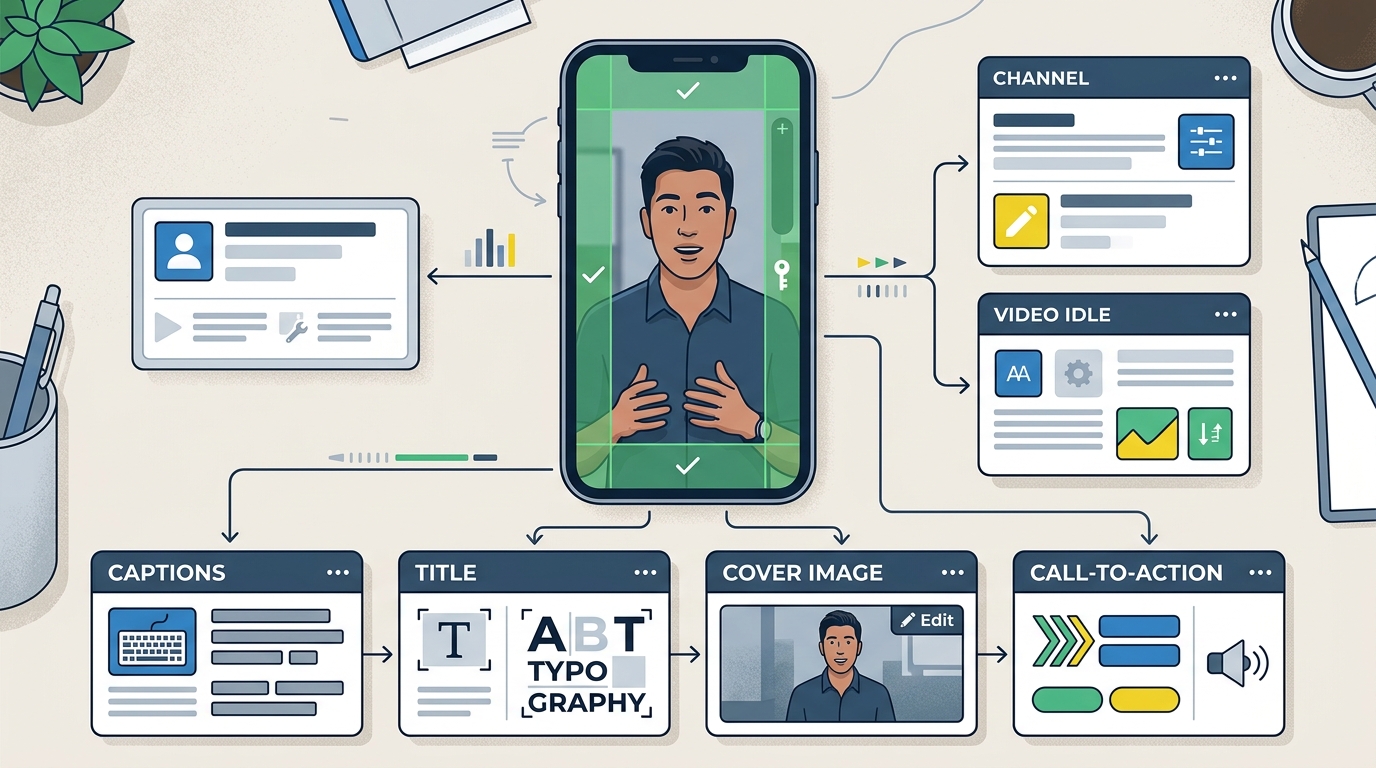
For short-form video distribution, keep a clean master file outside every social platform. Don't treat a downloaded copy of a published post as your archive.
A practical master should contain:
- No platform watermark
- No interface-specific stickers
- No destination-specific caption baked into the footage
- Editable project files when possible
- Separate caption and title copy
- Brand elements you have permission to use
A 1080 by 1920 pixel, 9:16 canvas is a common practical starting point for vertical short-form video. It is not a universal requirement for every destination or format. Syllaby's cross-platform safe-zone guide is also a secondary-source reference for planning where important elements can sit. Treat its safe-zone guidance as a starting point, because platform interfaces and overlays can change.
Getting the canvas dimensions right does not guarantee that every element will remain visible. Platforms place captions, buttons, account details, and controls over different parts of the frame.
Keep faces, demonstrations, subtitles, and essential calls to action away from the extreme top, bottom, and right edge. Decorative footage can extend beyond that area because losing part of it won't change the meaning. Preview the finished post on each destination before relying on a shared layout.
When simple cross-posting is the right choice
Cross-posting is usually reasonable when the core asset is self-contained and the audience's reason for watching is similar across destinations.
Good candidates include:
- A concise product demonstration
- A short educational explanation
- A before-and-after process, presented accurately
- A frequently asked question
- A behind-the-scenes clip with broad relevance
- A short excerpt that doesn't depend on missing context
For example, a bakery showing how laminated dough is folded may not need a completely different video for every short-form channel. The clean footage can remain the same while the title, caption, and audience prompt change.
Cross-posting can also be useful when you're testing where an idea fits. Broad distribution may give you directional evidence about audience response, provided you compare similar posts within each channel and avoid treating raw views as equivalent measurements.
When channel-native content is worth the extra work
Create a native version when adaptation would require more than changing the packaging.
The format carries the value
A detailed framework might work better as a LinkedIn document, a blog post, or a long-form tutorial than as a compressed short video. If removing detail would make the advice misleading, choose a format that supports the necessary explanation.
The audience needs different context
A marketing automation topic might be framed around client reporting for agencies, consistency for creators, and limited staffing for small businesses. The underlying subject is related, but each audience has a different practical concern.
The post depends on a platform feature
Polls, collaborative formats, interactive stickers, live streams, threaded discussions, and document posts aren't interchangeable. If a platform feature is central to the concept, build for that feature.
The content supports a major business objective
A product launch, research release, or important campaign may justify a larger native investment. High-priority content benefits from deliberate sequencing, tailored creative, and destination-specific follow-up.
Previous results reveal a clear pattern
If a topic repeatedly performs well in one format on one channel, invest further. Treat that pattern as evidence for another test, not a guarantee of future performance.
A practical platform-aware distribution workflow
The following workflow is designed for a creator or small team that cannot produce four separate campaigns every day.
Step 1: Define the core message
Write one sentence describing what the audience should understand or be able to do after consuming the content.
If that sentence is vague, distributing the asset more widely won't fix it.
Step 2: Choose a primary format
Select the format that explains the idea most effectively. This could be a short video, article, tutorial, interview, or carousel.
The primary format is your source asset, not necessarily the only version you will publish.
Step 3: Export a clean master
Save the original file before adding platform-specific stickers, music, links, or calls to action. Keep supporting materials, such as the transcript, research notes, and source links, with the project.
This makes future adaptation easier and reduces the temptation to download a compressed, watermarked social copy.
Step 4: Create a destination checklist
For each channel, answer:
- Who is likely to see this here?
- What context will they be missing?
- Does the format display correctly?
- Is any important text covered?
- Does the requested action work?
- Are the title and caption accurate?
- Does a person need to review comments after publication?
If the answers are nearly identical across destinations, light adaptation is likely enough. If they differ substantially, create a native version.
Step 5: Schedule through supported publishing connections
When evaluating a social media automation tool, look beyond the number of supported channels. Confirm that it lets you edit destination-specific fields rather than forcing one caption and configuration everywhere.
Useful workflow capabilities include:
- Separate captions and titles by destination
- Preview or validation before publishing
- Draft and approval controls
- A reusable media library
- Clear publishing status and error reporting
- Performance records tied to each version
Automation should reduce repeated data entry while preserving editorial control.
Step 6: Review the live post
A successful upload doesn't prove the post looks right. Open the published version and check the cover, crop, subtitles, links, mentions, and visible text.
Correct serious problems promptly. Record recurring issues so they can be prevented at the template level.
Step 7: Compare results by purpose
Don't judge every post solely by views. Select metrics that match the job of the content.
| Content purpose | Useful signals to review |
|---|---|
| Awareness | Reach, qualified views, profile visits |
| Education | Watch completion, saves, useful questions |
| Conversation | Relevant comments, replies, direct responses |
| Site discovery | Qualified clicks, landing-page engagement |
| Conversion support | Sign-ups or inquiries attributable to the content |
Platform metrics and definitions aren't always directly comparable. Look for trends within each channel and compare similar posts over time.
Use a tiered content model
A tiered model helps decide how much production effort a post deserves. It also gives a team a shared rule for when automation is appropriate.
Tier 1: Direct reuse
Publish the clean asset with basic checks and destination-specific metadata. Use this for simple, self-contained videos whose meaning and presentation travel well.
Tier 2: Adapted reuse
Keep the core footage or argument, then change the opening, caption, cover, examples, or call to action. This is a sensible default for many lean teams.
Tier 3: Channel-native production
Rebuild the content around a particular audience, format, or platform capability. Reserve this effort for important campaigns, proven opportunities, or concepts that would lose value through simple reuse.
Before publishing, the team should be able to explain why a post belongs in its chosen tier. That decision is more useful than applying the same production rule to every asset.
Where AI can help, and where it still needs supervision
AI-assisted tools can speed up several parts of the workflow:
- Turning a transcript into draft captions
- Suggesting alternate openings for different audiences
- Extracting short clips from a longer source
- Reformatting a researched idea into several content types
- Producing draft titles and descriptions
- Organizing performance observations for later review
Human review remains important. An AI system may omit necessary context, create inaccurate copy, produce repetitive captions, or recommend an action that doesn't fit the destination.
The person publishing should verify factual claims, permissions, brand voice, disclosure requirements, and links. Community interaction also requires judgment that shouldn't be reduced to automated generic replies.
MG Social Studio combines research, short-form video creation, blog workflows, publishing, and Growth Copilot recommendations in one workspace. For a small team, that can make it easier to move from an idea to a reviewed, destination-specific post without switching between as many disconnected tools. The user remains responsible for deciding what to publish and reviewing the result.
Start creating with MG Social Studio.
Results vary. AI-generated recommendations and content should be reviewed before publishing.
Frequently asked questions
Should I post the exact same video on every platform?
You can reuse a clean core video when its subject, format, and context work across destinations. Review the caption, title, cover, text placement, and call to action separately. Create a native version when the audience or format requires substantially different treatment.
Is cross-posting the same as content repurposing?
Not exactly. Cross-posting usually means distributing the same core asset in several places. Repurposing changes the asset into another form, such as turning a webinar into short clips, a blog post, and a document carousel.
How do I avoid watermarks when cross-posting?
Export and store the clean original from your editing or content creation tool before publishing it to any social platform. Build each destination post from that master rather than downloading a copy from another network.
Should every channel have a different caption?
Not necessarily. If the same caption is accurate, understandable, and appropriate in each destination, small edits may be enough. Change it when audience context, links, mentions, tone, or available actions differ.
How many channels should a small business use?
Use the number your team can maintain with appropriate quality control and follow-up. It is usually better to learn from a manageable set of relevant channels than to distribute everywhere without checking the results.
Can AI automate the whole distribution process?
AI can assist with drafting, adaptation, organization, and publishing workflows. It shouldn't be treated as a substitute for factual review, strategic decisions, rights management, policy checks, or genuine audience interaction.