
content repurposing
The Podcast Content Repurposing Playbook: 12 Channel-Native Assets From One Episode
Turn one podcast episode into 12 useful assets without publishing the same content everywhere. This practical playbook covers asset selection, AI-assisted production, editorial review, distribution, and measurement.
By MillsGuild Editorial ·
The Podcast Content Repurposing Playbook: 12 Channel-Native Assets From One Episode
A podcast episode can supply far more than an audio feed and a promotional clip. It can become a searchable video, a useful article, several focused social posts, an email, and a practical resource for prospective customers.
The catch is that these assets should not be identical copies.
A transcript pasted into a blog editor is not a finished article. A landscape video cropped to 9:16 is not automatically a good short. A caption copied from Instagram may feel out of place on LinkedIn. Effective podcast content repurposing preserves the original idea while changing its structure, presentation, and call to action for each destination.
This playbook explains 12 assets you can create from one episode, how to decide which ones are worth producing, and where AI can reduce work without taking over editorial judgment.
What is podcast content repurposing?
Podcast content repurposing is the process of transforming an episode's ideas, stories, explanations, and media into formats designed for other channels.
The word “transforming” matters. Simple cross-posting distributes the same file or message. Repurposing rebuilds the material around a different audience behavior.
For example:
- Some YouTube viewers may want the complete conversation with chapters.
- A search visitor may want a direct answer to one question discussed in the episode.
- A LinkedIn reader may respond to a concise professional observation.
- An email subscriber may want context, commentary, and a reason to listen.
- A short-form video viewer needs a self-contained idea that makes sense without hearing the preceding 20 minutes.
Channel-native production acknowledges those differences. Guidance from Fame on podcast promotion and repurposing likewise recommends adapting assets for the channels where they will be used instead of treating the full episode as the only finished product.[3]
Start with an asset brief, not an automatic clip generator
Before uploading an episode to an AI tool, define what the episode contains. A short asset brief keeps the workflow tied to the source instead of allowing generated copy to drift into unsupported claims.
Record the following:
- The main audience question: What problem does this episode help solve?
- The central argument: What should the listener understand by the end?
- Three to five useful takeaways: Which ideas can stand on their own?
- Supporting evidence: Which statistics, product details, names, or quotations require verification?
- Potential clips: Where does a speaker complete a clear thought with a beginning and conclusion?
- The next step: What should an interested person do after consuming an asset?
This planning can start before recording. A structured interview with specific questions, tactical explanations, and clear transitions is easier to repurpose than a conversation that wanders between unrelated subjects. Fame's podcast guidance recommends planning for reusable moments during production rather than trying to manufacture them all afterward.[6]
The transcript then becomes a working source document. It is useful for locating passages and drafting derivatives, but it should not be treated as automatically accurate. Names, figures, URLs, technical terminology, and speaker attribution still need review.
The 12 channel-native assets
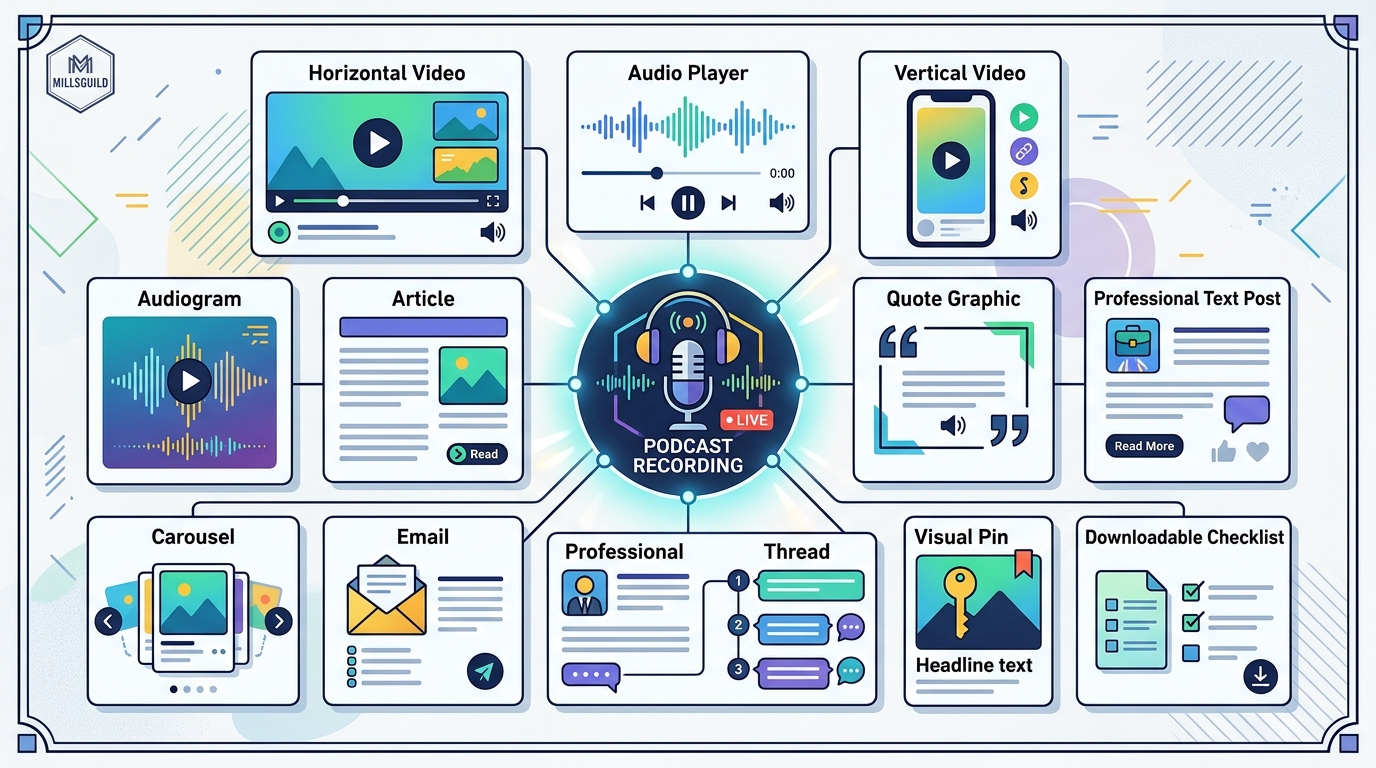
You do not need to produce all 12 assets after every episode. Think of this as a menu. Select formats based on the quality of the source material, where your audience is active, and what your team can review properly.
1. A full-length YouTube video
Best for: Complete interviews, demonstrations, searchable explanations, and viewers who prefer video.
Publish the full conversation in a horizontal format when the recording quality supports it. Improve usability with a descriptive title, a useful description, chapters, speaker information, and links to relevant resources.
The edit should remove obvious setup delays, technical interruptions, and material the speakers agreed not to publish. It does not have to eliminate every pause. Excessive jump cuts can make a natural conversation feel mechanical.
If the episode was recorded as audio only, consider whether a static-image video offers enough value. A carefully designed audiogram or a narrated visual summary may be better than presenting a motionless image for an hour.
2. The audio podcast episode
Best for: Existing subscribers and people who listen while commuting, exercising, or working.
The original audio episode remains an important asset. Give it the same editorial attention as the derivatives. Clean up disruptive noise, balance speaker levels, write specific show notes, and make the episode title understandable outside the context of your show.
Show notes should help listeners evaluate the episode. Include the central question, major topics, guest details, relevant resources, and a clear next step. Avoid turning them into a wall of loosely related keywords.
3. Short vertical video clips
Best for: YouTube Shorts, Instagram Reels, TikTok, and other vertical video feeds.
Extract clips that deliver one complete idea. A useful short usually contains:
- A hook that identifies the problem or tension
- Enough context to understand the speaker's point
- The explanation, example, or conclusion
- A restrained call to action when one is relevant
Do not select a passage merely because it sounds provocative. If the speaker qualifies the statement 15 seconds later, include the qualification or choose another passage.
Add accurate captions and reframe the speakers for a vertical canvas. Review line breaks, spelling, timing, and whether captions cover faces or interface elements. If you add stock footage or generated visuals, make sure they clarify the subject rather than distract from it.
YouTube's monetization policies distinguish between content that adds meaningful original value and repetitive or minimally changed material.[5] A clip taken from your own podcast may provide original source material, but ownership alone does not establish monetization eligibility. The finished Short still needs to comply with YouTube's current policies and offer viewers a meaningful viewing experience.
4. An audiogram
Best for: Strong audio moments when suitable video is not available.
An audiogram combines a short audio excerpt with a branded visual, captions, and sometimes a waveform. It can rescue a valuable passage from an audio-only recording, but the visual should communicate what the clip is about before someone turns on the sound.
Use a clear headline, identify the speaker, and keep the excerpt focused. A waveform alone rarely provides meaningful context. Treat it as a supporting design element rather than the main reason to watch.
5. A search-focused article
Best for: Answering a durable audience question on your own website.
A podcast transcript is source material for an article, not the article itself. Spoken conversations contain interruptions, references such as “that thing we mentioned earlier,” and transitions that make sense only in sequence. An article needs a clear search intent and an independent structure.
Choose one primary question the episode can answer well. Then:
- Give the direct answer near the beginning.
- Organize supporting points under descriptive headings.
- Add definitions or context the speakers assumed readers already knew.
- Verify factual claims using reliable sources.
- Attribute the guest's original opinions accurately.
- Embed the episode when it helps the reader.
- Add timestamps if readers may want to hear the full discussion.
Captivate's podcast SEO guidance recommends giving episode pages useful written context, clear formatting, and navigable information rather than relying on an unedited transcript alone.[2]
A cleaned transcript can still be offered below the article or in a separate section of the page. Label it clearly so readers know what they are opening.
6. Quote graphics
Best for: Memorable original observations, concise definitions, and brand-consistent visual posts.
Select quotations that remain accurate outside the conversation. Avoid trimming away words that change the speaker's meaning. Confirm the final text against the recording, not only the machine transcript.
A quote graphic needs more than decorative typography. Include the speaker's name and enough subject context to make the statement useful. If the quote contains a statistic or factual claim from another source, cite that source in the caption or redesign the post as an evidence-based graphic.
Quote graphics are usually weak candidates for a direct sales pitch. Their primary job is to communicate a sharp idea and introduce the speaker's perspective.
7. A takeaway carousel
Best for: Step-by-step frameworks, checklists, comparisons, and educational summaries on LinkedIn or Instagram.
A carousel works when the episode contains a sequence that can be understood visually. Give each slide one job:
- Cover: State the useful promise.
- Context: Explain who the advice is for.
- Body slides: Present one step or idea at a time.
- Final slide: Offer a next step or question.
Do not cram the full transcript into eight small panels. Rewrite for scanning. Use short headings, readable type, consistent visual hierarchy, and enough detail for the carousel to make sense without the original episode.
If the source discussion contains five steps, preserve the actual five steps. Do not ask AI to expand it to ten simply because a longer list looks more substantial.
8. An email newsletter
Best for: Reaching an audience you can contact directly instead of depending entirely on social distribution.
The email should give subscribers a reason to care before asking them to listen. Start with the problem, a useful observation, or a brief piece of context that was not obvious from the episode title. Then link the insight to the full conversation.
Several newsletter structures can work:
- One important lesson followed by commentary
- Three takeaways with a link to the complete episode
- A question from the episode with a concise answer
- A behind-the-scenes note about why the topic was selected
Captivate and AWeber's podcast email guidance describes email as a way to build an ongoing relationship with podcast audiences, rather than only an episode announcement system.[4] Treat that as a planning recommendation, then judge the effect using your own click, reply, unsubscribe, and downstream-action data.
Keep the email's primary action clear. Multiple competing buttons for the audio feed, video, article, download, consultation, and product can dilute the decision.
9. A LinkedIn text post
Best for: Professional lessons, founder observations, and questions that invite informed discussion.
Build the post around one idea rather than summarizing the entire episode. A practical structure is:
- State the observation.
- Explain why it matters to the intended reader.
- Give a concrete example from the conversation.
- Add your interpretation.
- Ask a specific question or suggest a relevant next step.
Do not fabricate a first-person story to make the post sound more personal. If the insight came from a guest, credit the guest. If it represents your own conclusion after the discussion, make that distinction clear.
A native post should still be useful if the reader never clicks through. The episode link can provide depth rather than acting as the only source of value.
10. An X thread or short post sequence
Best for: Breaking down an argument, sharing compact observations, or presenting a framework in order.
A thread should have a reason to be a thread. Use it when each post advances the same argument. Do not divide a paragraph into arbitrary fragments to increase the number of posts.
Start with the conclusion or problem. Follow with the reasoning, evidence, and practical implications. End with a link only if the original episode or article adds substantial value.
Review every post independently. Readers may encounter the middle of the sequence first, so references such as “this” or “the previous point” should remain understandable.
11. A Pinterest pin
Best for: Visual tutorials, evergreen checklists, how-to articles, templates, and topics with continuing discovery potential.
Pinterest is unlikely to fit every podcast. It may be useful when the episode covers a visual, practical, or planning-oriented subject that connects naturally to an evergreen page.
Design the pin around the destination resource, not around the fact that a new episode exists. “Podcast episode 42” gives a new visitor little reason to click. “A seven-step product launch checklist” explains the value immediately.
The pin should lead to a page that fulfills the promise in the image. If it promotes a checklist, the destination should contain or clearly provide that checklist.
12. A downloadable checklist or worksheet
Best for: Episodes with a repeatable process that readers may want to apply later.
Turn a genuine framework from the conversation into an action-oriented resource. Suitable formats include:
- A pre-recording checklist
- An interview preparation worksheet
- A campaign planning template
- A tool evaluation scorecard
- A post-publication quality review
The download should make the idea easier to use. It should not be an article exported to PDF solely to collect email addresses.
Check that every instruction can be traced to the episode or to clearly cited supporting research. Add space for notes, decisions, or status tracking. If access requires an email address, explain what the person will receive and how their information will be used.
A lean podcast content repurposing workflow
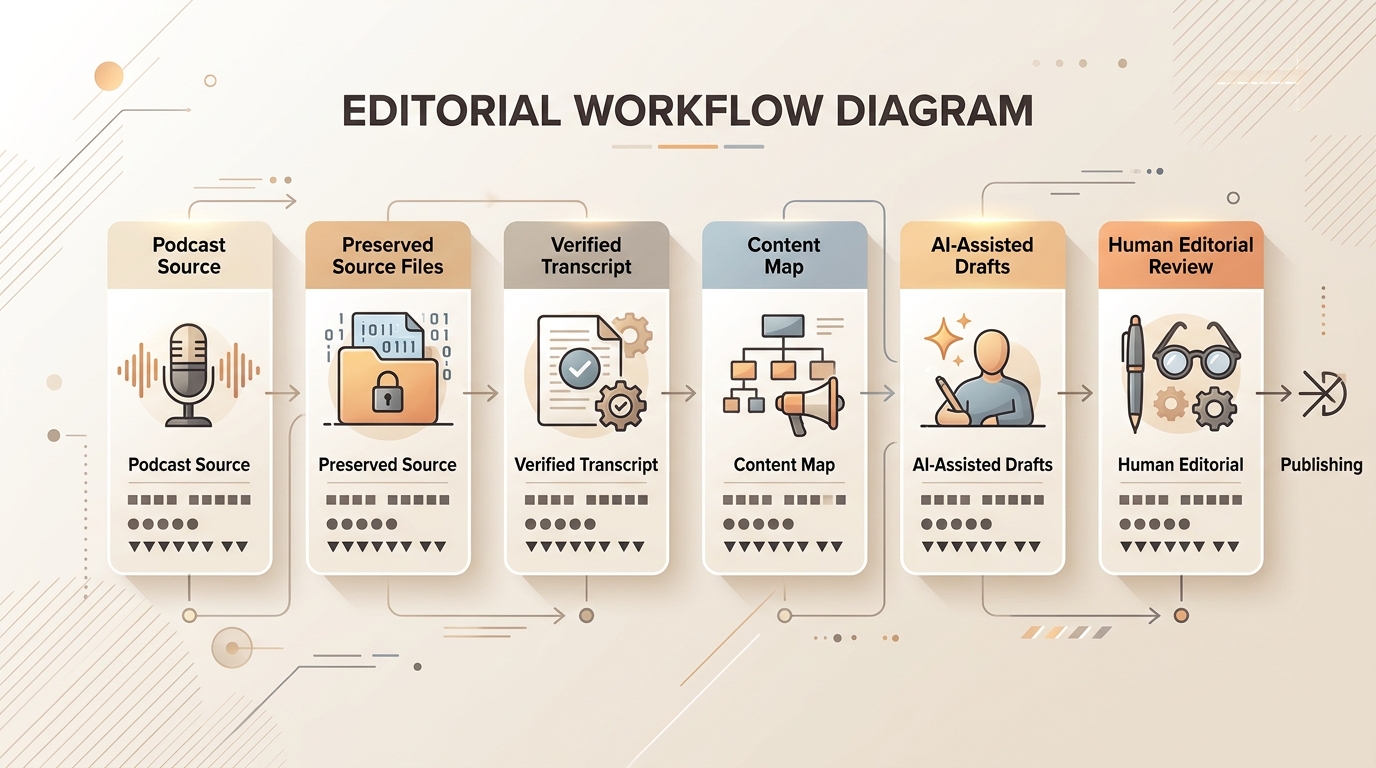
The most manageable workflow moves from one approved source to several controlled derivatives. Content Allies describes a similar source-first model in which the long-form recording becomes the basis for written, video, and social assets.[1]
Step 1: Preserve the source files
Keep the original audio, video, transcript, guest information, release permissions, and research notes together. Use consistent episode names so exports can be traced back to the correct recording.
Also document any restrictions. A guest may approve the complete interview but ask for a sensitive segment to be removed. That removal should carry through to clips, quotations, articles, and generated posts.
Step 2: Clean and verify the transcript
Run transcription, then review the passages you plan to publish. You may not need to perfect every filler word if the transcript is only an internal tool, but all public quotations and factual claims need checking.
Pay particular attention to:
- People and company names
- Product names
- Numbers, dates, and percentages
- Technical terms
- Negations such as “can” versus “can't”
- Speaker labels
Step 3: Create a content map
Mark the strongest sections by purpose, not only by timestamp. Useful labels include:
- Direct answer
- How-to sequence
- Contrarian opinion
- Example
- Definition
- Common mistake
- Story
- Quotable line
- Claim requiring verification
Then match each passage to a suitable format. A six-step explanation may support a carousel and checklist. A concise opinion might become a video clip and LinkedIn post. A detailed answer to a recurring question might justify a full article.
Step 4: Generate drafts in batches
AI can accelerate transcription, clip discovery, captioning, summaries, headline options, and first drafts. Generate by asset type so your review criteria remain consistent.
For example, draft all candidate video clips before designing quote cards. This makes it easier to see whether every asset repeats the same passage or whether the package represents the episode's full value.
Use source-bounded instructions. Tell the system to rely only on the supplied transcript, preserve qualifications, identify unclear claims, and avoid inventing examples or statistics.
Step 5: Apply human editorial review
Review each derivative against both the recording and its destination channel. Ask:
- Does it preserve the speaker's meaning?
- Can it stand alone?
- Is the claim supported?
- Does the format fit how people use the channel?
- Is the next step proportionate to the content?
- Are captions, names, and links accurate?
- Do we have permission to use the guest's image and words this way?
AI can surface candidate passages and produce drafts, but editorial review remains necessary for context, fairness, current claims, brand fit, and permissions. Treat this as a workflow safeguard rather than a claim that AI is incapable of making any useful editorial judgment.
Step 6: Publish in a deliberate sequence
You do not have to release everything on the episode's publication day. Staggering the assets gives the episode several opportunities to reach people without posting the same message repeatedly.
A simple sequence might be:
- Publication day: Audio episode and full video
- Day 2: Newsletter
- Day 3: First vertical clip
- Day 5: LinkedIn observation
- Week 2: Search-focused article
- Week 2 or 3: Carousel or checklist
- Later: Additional clips tied to relevant conversations or recurring questions
This is a planning example, not a universal optimal schedule. Your own audience activity and production capacity should determine the cadence.
How to choose which assets to produce
Producing all 12 formats can create a large approval burden. A smaller, well-reviewed package is usually more useful than a pile of rushed derivatives.
Use three filters.
Audience fit
Where does your intended audience already consume this kind of information? A B2B interview may support YouTube, LinkedIn, email, and an article. A visual hobby tutorial may have stronger potential on YouTube, Instagram, and Pinterest.
Do not add a channel solely because an automation tool can publish there.
Source fit
Match the asset to what the episode genuinely contains. A tactical episode may produce a strong checklist. A personal conversation may provide better clips and an email essay. A timely news discussion may not justify an evergreen article unless it contains a durable question.
Review capacity
Every additional format creates work involving editing, fact-checking, design, accessibility, approval, publishing, and measurement. If nobody can perform those checks, reduce the package.
A practical minimum package for many lean teams is:
- The audio episode or complete video
- Two or three carefully edited vertical clips
- One substantial written asset, such as an article or newsletter
- One platform-specific social post
Add carousels, graphics, pins, and downloads only when the material warrants them.
What to automate and what to keep under human control
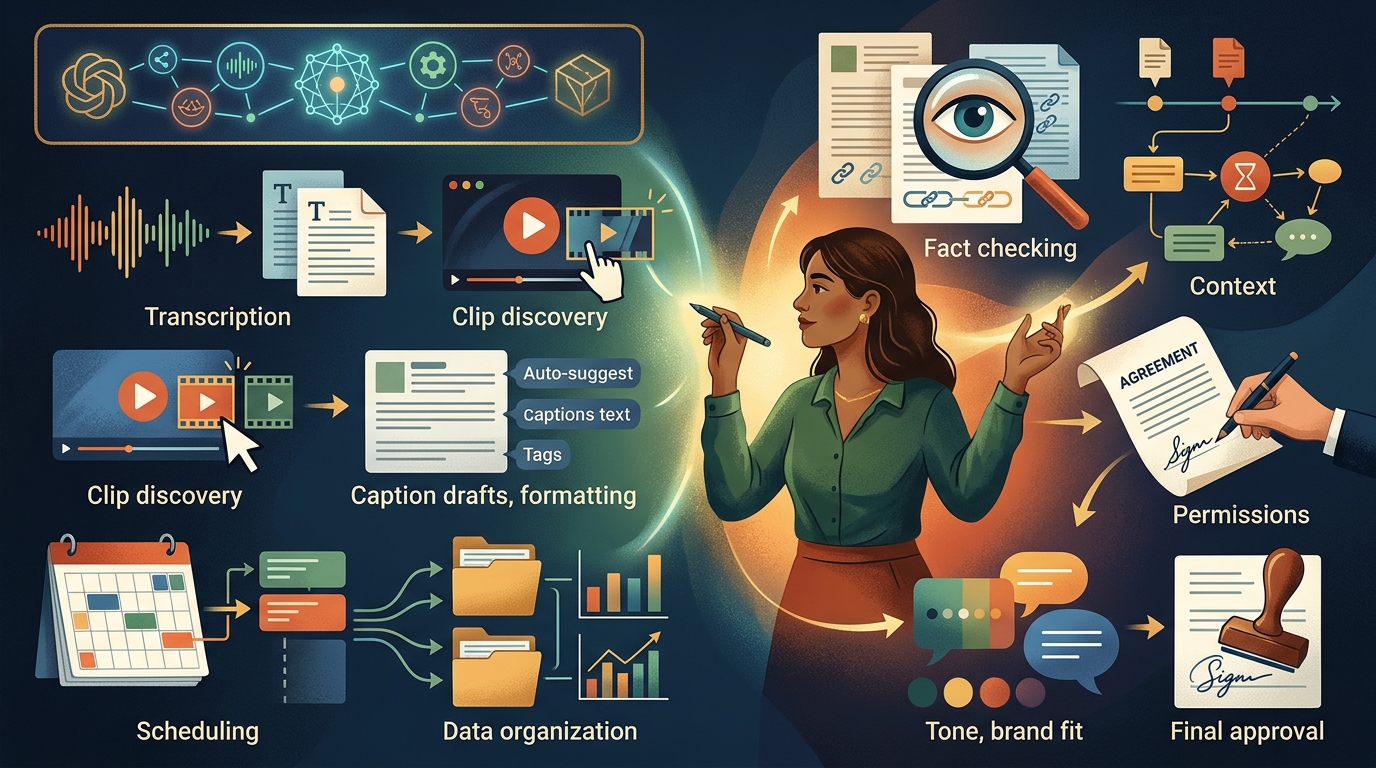
Automation is most useful for repeatable production tasks with clear review criteria.
Good candidates for AI assistance:
- Producing a first-pass transcript
- Locating passages related to a defined topic
- Suggesting clip boundaries
- Reframing video for different aspect ratios
- Drafting captions and titles
- Converting a verified outline into a first draft
- Resizing approved creative
- Scheduling approved assets
- Organizing performance data
Keep a person responsible for:
- Choosing the central argument
- Confirming quotations and facts
- Deciding whether a clip is fair to the speaker
- Preserving legal, privacy, and contractual restrictions
- Approving generated visuals
- Adjusting tone for the channel
- Making final publication decisions
An integrated workflow can reduce the handoffs between transcription, video editing, writing, scheduling, and analysis. MG Social Studio supports AI-assisted short-form video, blog creation, research, publishing workflows, and Growth Copilot recommendations in one environment. The goal is to make production easier while preserving editorial control, not to publish every generated draft automatically.
Measure assets by their job
Do not judge every format by views. Each asset serves a different purpose, so its metrics should reflect that purpose.
| Asset | Primary job | Useful signals |
|---|---|---|
| Full video | Depth and trust | Watch time, audience retention, relevant comments |
| Audio episode | Ongoing listening | Downloads, completion data where available, subscribers |
| Vertical clip | Discovery | Retention, completion, qualified profile or episode visits |
| Article | Search and education | Relevant search visits, engaged reading, useful conversions |
| Newsletter | Direct audience relationship | Clicks, replies, unsubscribes, downstream actions |
| LinkedIn post | Professional conversation | Relevant comments, saves, profile visits |
| Carousel | Education and reference | Saves, shares, slide engagement where available |
| Checklist | Practical application | Downloads, completion actions, qualified follow-up |
Look for patterns across several episodes. One clip can perform differently because of its topic, opening, guest, timing, or competition in the feed. A single result is rarely enough to prove that a format always works or never works.
Your review can produce concrete decisions: use shorter introductions, choose clips with clearer conclusions, publish fewer quote cards, expand articles that answer recurring questions, or stop maintaining a channel that consumes time without serving the intended audience.
Common podcast repurposing mistakes
Publishing the raw transcript as the article
A transcript preserves conversation. An article organizes an answer. Readers should not have to work through greetings, tangents, and audio references to find the useful section.
Letting clips remove necessary context
A dramatic fragment may attract attention while misrepresenting the speaker. Include qualifications and conclusions, even if that makes the clip longer.
Using the same caption everywhere
The core idea can remain consistent, but the framing, vocabulary, formatting, and next step should fit the destination.
Manufacturing more assets than the episode supports
Not every recording contains 12 strong ideas. Repeating one quotation across a clip, graphic, carousel, thread, and email creates apparent volume without adding much value.
Automating publication without approval
Transcription errors and unsupported summaries can move quickly through a connected workflow. Require approval before scheduling, especially for customer claims, quotations, regulated subjects, and current product information.
Measuring activity instead of outcomes
Publishing 30 derivatives is an output metric. It does not show whether people watched, learned, subscribed, visited a relevant page, or took a useful next step.
Build a system you can sustain
The strongest podcast content repurposing workflow is the one your team can repeat while maintaining accuracy, channel fit, and a recognizable point of view.
Start with four assets. Track the time needed to produce and approve them. Review which formats lead to meaningful attention or action. Add another format when the source material and audience behavior justify it.
AI can make the workflow faster by handling first passes, formatting, extraction, and organization. It still needs a responsible editor. Results vary. AI-generated recommendations and content should be reviewed before publishing.
Frequently asked questions
How many pieces of content can you create from one podcast episode?
A strong episode can support a full video, audio release, several clips, an article, email, social posts, graphics, a carousel, and a downloadable resource. The right number depends on how many distinct ideas the episode contains and how much editorial review your team can provide. Treat 12 as a menu rather than a production quota.
Should I publish a podcast transcript for SEO?
A transcript can improve accessibility and give readers another way to use the episode, but it should be checked and formatted. For search-focused content, create a structured article that answers a defined question. You can include the cleaned transcript separately or below the article.
Can AI repurpose a podcast automatically?
AI can transcribe recordings, identify possible clips, draft posts, create captions, and help format written assets. Human review is still needed to verify claims, preserve context, correct errors, maintain brand voice, and approve publication.
Should the same podcast clip be posted on every social platform?
The underlying clip can be reused when it fits, but presentation may need to change. Review the opening, caption style, aspect ratio, on-screen text, description, and call to action for each channel. Do not assume one export is equally effective everywhere.
Which podcast assets should a small team create first?
Begin with the core episode, two or three strong short clips, one substantial written asset, and one post for the channel where your audience is most active. Add more formats after you understand the review workload and the results from the first package.
Sources
Sources
- https://contentallies.com/learn/how-to-repurpose-podcast-content
- https://www.captivate.fm/podcast-growth/marketing/podcast-seo-keyword-research
- https://www.fame.so/learn/guides/b2b-podcast-promotion
- https://www.captivate.fm/wp-content/uploads/2020/12/Email-Marketing-for-Podcasters-Captivate-and-AWeber.pdf
- https://support.google.com/youtube/answer/1311392
- https://www.fame.so/post/content-marketing-podcast