
AI search visibility
Schema Markup for AI Search: A Practical JSON-LD Guide
Schema markup can clarify your organization, authors, articles, and videos for search systems, but it is not a shortcut to AI citations. This practical guide explains which JSON-LD types matter, how to connect them, and how to validate your implementation.
By MillsGuild Editorial ·
Schema Markup for AI Search: A Practical JSON-LD Guide
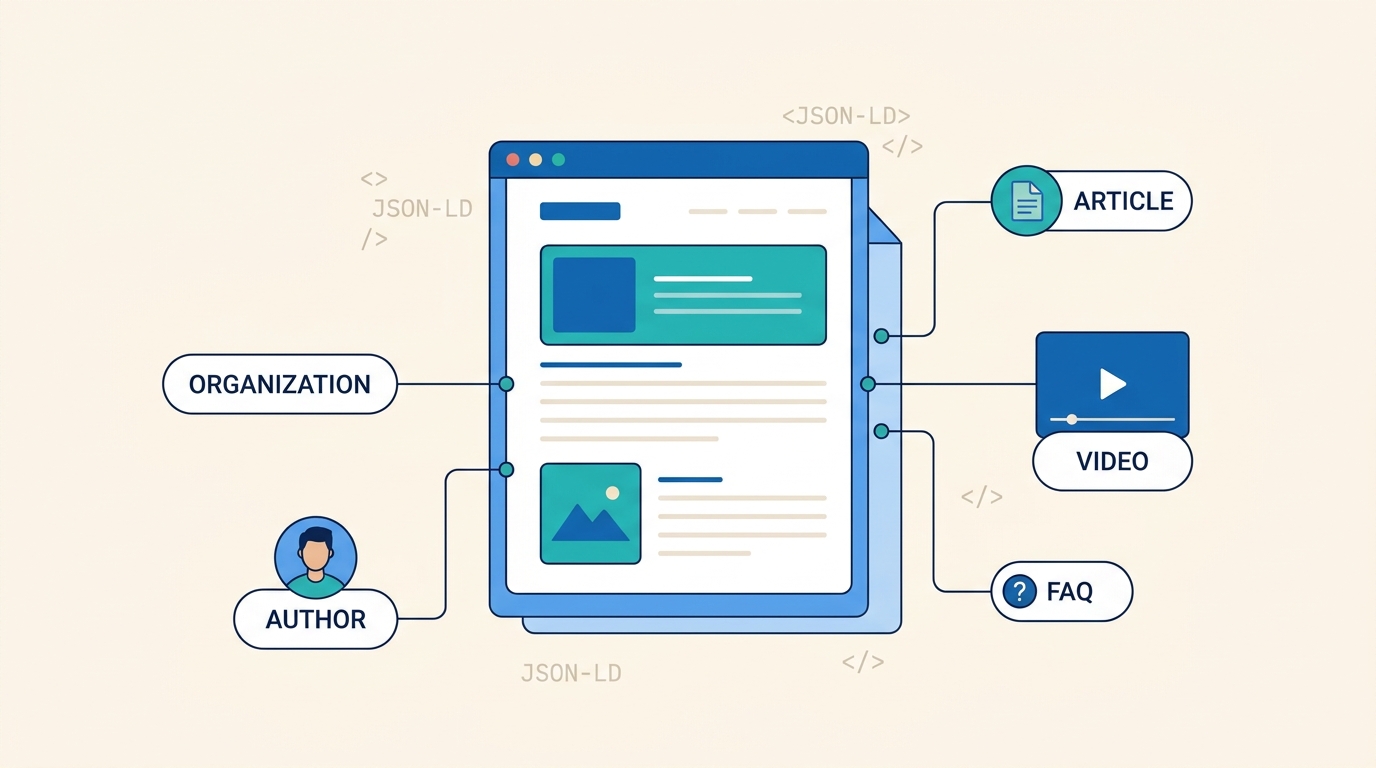
Schema markup gives search systems a structured description of a page. It can identify the organization behind a website, connect an article to its author, describe an embedded video, and distinguish a publication date from a modification date.
That makes schema useful as search becomes more dependent on entity recognition and machine-readable information. It does not guarantee that Google AI Overviews, ChatGPT, Perplexity, or another AI product will cite your page.
Google says there are no additional technical requirements or special schema types needed to appear in its AI search features. The familiar SEO fundamentals still apply: a page needs to be crawlable, indexable, useful, and eligible to appear in search. Structured data helps describe that page, but it cannot compensate for thin, inaccurate, or inaccessible content.
For creators, small businesses, and lean marketing teams, the practical goal is simple: use a small set of accurate schema types, connect them consistently, and keep the markup aligned with what visitors can see.
What schema markup does for AI search
Schema markup is structured metadata based on the Schema.org vocabulary. It labels information that might otherwise be ambiguous.
For example, an article page may contain a company name, an author name, two dates, and a video. Structured data can state their relationships explicitly:
- The organization publishes the website.
- The person wrote the article.
- One date is the original publication date.
- A later date reflects a substantive update.
- The video is associated with the page.
These declarations can help supported search systems understand and display page information. They may also reinforce consistent entity information across your site. Because AI retrieval systems do not all work the same way, clean JSON-LD is best treated as semantic infrastructure rather than a citation tactic.
Is there a special AI schema type?
No official “AI schema” is required for Google Search or its AI features. Do not add a made-up AIOptimizedContent type, an “LLM schema,” or properties invented by an SEO tool.
Use recognized Schema.org types that accurately describe the page. For most small business and creator websites, the useful starting set is:
| Schema type | What it describes | Typical placement |
|---|---|---|
Organization | The business or brand behind the site | Home page or site-wide template |
Person | A creator, founder, or author | Author profile and linked article markup |
Article or BlogPosting | An editorial article or blog post | Individual article pages |
VideoObject | A video published or embedded on a page | Video landing pages and articles with important videos |
FAQPage | A page containing one answer from the publisher for each question | Genuine FAQ sections with visible questions and answers |
LocalBusiness | A business serving customers from a physical location or service area | Relevant local business pages |
Start with accurate identity, authorship, page, date, image, and video information. Add specialized types only when the page supports them.
Why JSON-LD is usually the practical format
Google supports JSON-LD, Microdata, and RDFa. Its documentation recommends JSON-LD in most cases because the markup can be maintained separately from the visible HTML.
A JSON-LD block normally appears inside a script element:
<script type="application/ld+json">
{
  "@context": "https://schema.org",
  "@type": "Organization",
  "name": "Example Studio",
  "url": "https://www.example.com/"
}
</script>
Visitors do not see this block as page copy. Crawlers that support JSON-LD can read its fields and relationships.
JSON-LD is convenient for automated publishing because a content system can generate fields from an article record. The headline can come from the article title, dates from the publishing history, and the author reference from a maintained profile. Automation still needs safeguards: an incorrect author, old logo, or constantly changing modification date can spread inaccurate information across many pages.
Build a connected schema foundation
Establish your organization identity
An Organization node provides a stable identity that other pages can reference. Use a consistent @id, usually a permanent URL followed by a fragment such as #organization.
<script type="application/ld+json">
{
  "@context": "https://schema.org",
  "@type": "Organization",
  "@id": "https://www.example.com/#organization",
  "name": "Example Studio",
  "url": "https://www.example.com/",
  "logo": {
    "@type": "ImageObject",
    "url": "https://www.example.com/images/logo.png"
  },
  "sameAs": [
    "https://www.linkedin.com/company/example-studio",
    "https://www.youtube.com/@examplestudio"
  ]
}
</script>
Replace every example value with a real URL. Include only sameAs profiles that represent the same organization. A directory listing, partner page, or loosely related profile is not automatically equivalent to the business.
A company with a physical location may need a more specific subtype such as LocalBusiness. Choose the type that accurately describes the entity.
Create stable author entities
Clear authorship helps readers and systems understand who produced a page. Each regular author should have a stable profile URL and, ideally, an @id based on that URL.
{
  "@type": "Person",
  "@id": "https://www.example.com/authors/alex-rivera/#person",
  "name": "Alex Rivera",
  "url": "https://www.example.com/authors/alex-rivera/",
  "jobTitle": "Content Strategist",
  "worksFor": {
    "@id": "https://www.example.com/#organization"
  },
  "sameAs": [
    "https://www.linkedin.com/in/alex-rivera"
  ]
}
The profile page should contain useful, visible information about the person. For a company-written page with no individual byline, use the organization as the author if that accurately reflects the visible attribution.
Mark up articles and blog posts
Article is the general type for editorial content. BlogPosting is a more specific subtype and is suitable for most blog articles.
<script type="application/ld+json">
{
  "@context": "https://schema.org",
  "@type": "BlogPosting",
  "@id": "https://www.example.com/blog/json-ld-guide/#article",
  "mainEntityOfPage": {
    "@type": "WebPage",
    "@id": "https://www.example.com/blog/json-ld-guide/"
  },
  "headline": "A Practical Guide to JSON-LD",
  "description": "Learn how to add and validate JSON-LD structured data.",
  "image": [
    "https://www.example.com/images/json-ld-guide.jpg"
  ],
  "datePublished": "2025-02-12",
  "dateModified": "2025-03-08",
  "author": {
    "@id": "https://www.example.com/authors/alex-rivera/#person"
  },
  "publisher": {
    "@id": "https://www.example.com/#organization"
  }
}
</script>
Keep these fields synchronized with the page. headline should describe the same article as the visible headline. datePublished should be the real original publication date. dateModified should change when the content is substantively updated, not whenever the page template runs. The author should match the visible byline, image should point to a crawlable representative image, and mainEntityOfPage should point to the canonical page.
Google may use Article structured data to understand article details and support relevant search appearances, but valid markup does not guarantee a rich result.
Use VideoObject for important video content
Video is useful for creators repurposing a recording into clips, articles, newsletters, and social posts. The surrounding web page adds context that a standalone embed may not communicate clearly.
Google's Video structured data documentation identifies name, thumbnailUrl, and uploadDate as required properties for its video features. For the intended Google video feature, provide either contentUrl or embedUrl, along with other useful details where available.
<script type="application/ld+json">
{
  "@context": "https://schema.org",
  "@type": "VideoObject",
  "@id": "https://www.example.com/guides/video-schema/#video",
  "name": "How to Add VideoObject Schema",
  "description": "A practical walkthrough of VideoObject JSON-LD.",
  "thumbnailUrl": [
    "https://www.example.com/images/video-schema-thumbnail.jpg"
  ],
  "uploadDate": "2025-03-10T09:00:00-05:00",
  "duration": "PT6M42S",
  "embedUrl": "https://www.youtube.com/embed/EXAMPLE_ID",
  "publisher": {
    "@id": "https://www.example.com/#organization"
  }
}
</script>
Use ISO 8601 formatting for dates and durations. In this example, PT6M42S means six minutes and forty-two seconds.
Should the transcript go inside VideoObject schema?
Schema.org defines a transcript property for VideoObject, but Google does not list it as a required property for its video rich-result documentation. If your publishing system supports the property accurately, you can include it.
The safer content strategy is to publish a useful transcript or written summary visibly on the page. Visible text supports visitors, accessibility workflows, and search systems without depending on a large script block. Review AI-generated transcripts for names, product terms, numbers, and speaker attribution before publishing. For long videos, use descriptive headings and timestamp links on the visible page.
Use FAQPage selectively
FAQPage is appropriate when the publisher supplies one accepted answer for each question. Every marked-up question and answer should be available to visitors on the page.
<script type="application/ld+json">
{
  "@context": "https://schema.org",
  "@type": "FAQPage",
  "mainEntity": [
    {
      "@type": "Question",
      "name": "Does schema markup guarantee an AI citation?",
      "acceptedAnswer": {
        "@type": "Answer",
        "text": "No. Schema markup can clarify page information, but it does not guarantee rankings, rich results, or citations from AI systems."
      }
    },
    {
      "@type": "Question",
      "name": "Does Google require special AI schema?",
      "acceptedAnswer": {
        "@type": "Answer",
        "text": "No. Google says no additional structured data or special schema is required for its AI search features."
      }
    }
  ]
}
</script>
FAQ rich-result eligibility is limited. Add the schema because it accurately describes useful content, not because you expect expandable search listings. A community forum is different. Pages where users contribute multiple answers may call for QAPage or DiscussionForumPosting, depending on the page and applicable guidelines.
Connect related entities with @graph
A page can contain several related entities. An article might reference an author, publisher, video, and webpage. An @graph lets you place those nodes in one JSON-LD block.
Stable @id values allow one entity to reference another:
{
  "@context": "https://schema.org",
  "@graph": [
    {
      "@type": "Organization",
      "@id": "https://www.example.com/#organization",
      "name": "Example Studio",
      "url": "https://www.example.com/"
    },
    {
      "@type": "Person",
      "@id": "https://www.example.com/authors/alex-rivera/#person",
      "name": "Alex Rivera",
      "worksFor": {
        "@id": "https://www.example.com/#organization"
      }
    },
    {
      "@type": "BlogPosting",
      "@id": "https://www.example.com/blog/json-ld-guide/#article",
      "headline": "A Practical Guide to JSON-LD",
      "author": {
        "@id": "https://www.example.com/authors/alex-rivera/#person"
      },
      "publisher": {
        "@id": "https://www.example.com/#organization"
      }
    }
  ]
}
A production article node should still include the relevant recommended fields from Google's documentation.
Schema markup for social media automation
Schema markup normally lives on pages you control. Adding SocialMediaPosting markup to your website does not alter the metadata of an Instagram, TikTok, LinkedIn, or YouTube post hosted on that platform's domain.
For an automated content workflow, focus on the owned destination page:
- Publish the original article, landing page, or video page on your website.
- Give it a stable canonical URL.
- Add accurate Article or VideoObject markup.
- Publish supporting text, a transcript, or a useful summary.
- Distribute social posts that point interested viewers back to the owned resource where appropriate.
If you maintain a public archive of brand-authored social posts, SocialMediaPosting may describe those pages. It should only be used when it accurately represents the content.
Common JSON-LD mistakes
Marking up information visitors cannot find
Structured data should represent the page where it appears. Avoid hidden reviews, invisible FAQs, fabricated credentials, and descriptions unrelated to the main content.
Treating validation as a performance guarantee
A valid result means the syntax and supported fields pass the relevant checks. It does not mean the page will rank, receive a rich result, or be cited by an AI answer.
Choosing a type for its label
Choose types according to the page. A normal blog post is not a NewsArticle simply because the label sounds more authoritative. A company-authored FAQ is not a discussion forum.
Creating conflicting entities
Conflicts can appear when a CMS, SEO plugin, theme, and tag manager each generate separate JSON-LD. Audit the rendered page source. Look for inconsistent organization names, duplicate article nodes, different canonical URLs, and multiple authors. Duplicate nodes are not automatically invalid, but conflicting descriptions create unnecessary ambiguity.
Faking freshness
Do not update dateModified automatically without changing the article. Use the field to reflect a real revision, and consider showing the updated date to readers.
Publishing unreviewed generated schema
Schema generators can produce plausible-looking output with invented URLs, unsupported properties, or placeholder values. Review generated markup as carefully as visible copy.
A practical validation workflow
Use both Schema.org and search-specific tools because they answer different questions.
1. Check the JSON syntax
Use a JSON validator or your editor. Missing commas, curly quotes, and unescaped line breaks are common problems.
2. Run the Schema Markup Validator
The Schema.org validator checks the vocabulary and displays detected entities and properties.
3. Run Google's Rich Results Test
The Rich Results Test checks whether Google detects structured data associated with supported rich-result features. A Schema.org-valid type may not correspond to a Google rich result.
4. Inspect the rendered page
Confirm that the script exists in the rendered HTML and is not blocked by a broken script, consent configuration, or publishing error.
5. Compare the markup with the visible page
Check the headline, byline, dates, organization name, image, video details, and FAQ answers. Accuracy matters more than filling every optional property.
6. Monitor Search Console
After publication and indexing, review relevant enhancement reports and URL Inspection results in Google Search Console. Fix recurring template errors at the source instead of editing pages one at a time.
An implementation plan for a lean team
You do not need to model an entire knowledge graph in one project. Begin with one accurate organization node, stable author profiles, and consistent @id values. Then standardize templates for BlogPosting and important VideoObject pages. Pull fields from maintained content records rather than asking editors to retype them.
Add FAQ, local business, product, event, or other specialized types only where the visible page supports them and the applicable guidelines are understood. Include structured data in the publishing checklist so editors can review the article, metadata, links, video details, and JSON-LD together.
MG Social Studio helps lean teams research, create, and publish content through a connected workflow, with Growth Copilot recommendations to support ongoing learning. It should be paired with an accurate structured-data implementation in your website or publishing system.
Start creating with MG Social Studio
Results vary. AI-generated recommendations and content should be reviewed before publishing.
Frequently asked questions
Does schema markup help a page appear in ChatGPT or AI Overviews?
Schema markup can make supported page information more explicit, but there is no reliable basis for promising inclusion or citation. Google says no special schema is required for its AI features. Treat structured data as one part of a broader search foundation that includes crawlability, useful visible content, clear sourcing, and consistent identity.
Is JSON-LD better than Microdata?
Google supports JSON-LD, Microdata, and RDFa. JSON-LD is usually easier to maintain because it does not require structured-data attributes to be woven through the visible HTML. Google recommends JSON-LD in most cases.
Which schema types should a creator use?
A creator with an owned website will usually get the clearest foundation from Person, Organization where applicable, Article or BlogPosting, and VideoObject. Add other types only when they accurately describe specific pages.
Should I put a full video transcript in JSON-LD?
Schema.org supports the transcript property for VideoObject, but it is not listed as a required Google video property. If you use it, keep it accurate. Also publish a reviewed transcript or substantial summary visibly on the page instead of relying only on the script block.
Can I add schema markup to social media posts?
You generally cannot control the structured data on a social platform's pages. You can add appropriate schema to an owned article, video page, or archive that supports your social campaign.
How often should schema markup be updated?
Update it whenever the underlying facts change, such as a new author profile, changed logo URL, substantive article revision, or corrected video metadata. Do not change dates or properties solely to create a false appearance of freshness.
Sources
- Google Search Central: AI features and your website
- Google Search Central: Introduction to structured data markup
- Google Search Central: General structured data guidelines
- Google Search Central: Organization structured data
- Google Search Central: Article structured data
- Google Search Central: Video structured data
- Google Search Central: Discussion forum structured data
- Google Search Central Blog: Changes to HowTo and FAQ rich results
- Schema.org: VideoObject
- Schema.org: transcript property
- Schema.org Markup Validator
- Google Rich Results Test
Sources
- https://developers.google.com/search/docs/appearance/ai-features
- https://developers.google.com/search/docs/appearance/structured-data/intro-structured-data
- https://developers.google.com/search/docs/appearance/structured-data/sd-policies
- https://developers.google.com/search/docs/appearance/structured-data/organization
- https://developers.google.com/search/docs/appearance/structured-data/article
- https://developers.google.com/search/docs/appearance/structured-data/video
- https://developers.google.com/search/docs/appearance/structured-data/discussion-forum
- https://developers.google.com/search/blog/2023/08/howto-faq-changes
- https://schema.org/VideoObject
- https://schema.org/transcript
- https://validator.schema.org/
- https://search.google.com/test/rich-results