
SEO opportunity research
How to Conduct an SEO Competitor Content Gap Analysis Without Enterprise Software
A practical, spreadsheet-based process for finding competitor content gaps with Google Search, Search Console, Google Trends, YouTube, TikTok, and carefully supervised AI analysis.
By MillsGuild Editorial · · Updated

How to Conduct an SEO Competitor Content Gap Analysis Without Enterprise Software
Enterprise SEO software can speed up keyword comparisons, but it is not required for a useful content gap analysis. A focused competitor set, a spreadsheet, and evidence from search, first-party data, customers, and native video platforms are enough to identify worthwhile opportunities.
The aim is not to collect the longest list of keywords. It is to answer a more useful question:
What does our audience need that competitors answer better, answer in a more useful format, or fail to answer at all?
The answer might lead to a new article, an updated landing page, a comparison table, a short video, an FAQ section, or a stronger internal link. The right production decision matters more than the number of rows in the spreadsheet.
What counts as a content gap?
A content gap is a mismatch between what an audience needs and what your current content provides. It can involve a subject, but it is not limited to a missing keyword.
Common examples include:
- Topic gap: Competitors cover a relevant subject that your site does not address.
- Intent gap: Your page covers the subject but misses the reason behind the search. A definition will not satisfy someone looking for a product comparison.
- Depth gap: Your page mentions the topic but leaves out steps, limitations, examples, or decision criteria.
- Format gap: Searchers appear to prefer a demonstration, template, table, or video while you provide only text.
- Funnel gap: You publish educational content but lack comparisons, implementation guides, or product-specific answers that support a decision.
- Freshness gap: Your instructions, screenshots, workflows, or platform details are outdated.
Each type suggests a different response. A missing topic may need a new page. An intent or depth problem usually calls for an update. A format gap may be solved by adding a video to an existing article.
What free tools can and cannot tell you
Manual research will not reproduce the estimated keyword databases, backlink reports, or automated overlap analysis available in paid platforms. It can still provide evidence of your site's search performance:
- Google results show which pages and formats appear for a query.
- Google Search Console shows queries already producing impressions for your site.
- Google Trends shows relative interest patterns and rising searches.
- YouTube and TikTok provide native discovery tools for video topics.
- Customer questions, support messages, comments, and sales calls reveal needs that keyword databases may miss.
Treat each source as one piece of evidence. Search results vary by location, device, personalization, and time. Search Console covers your property, not a competitor's. Google Trends reports relative interest, not absolute search volume. Native platform tools can vary by account, region, and interface version.
Build the analysis spreadsheet first
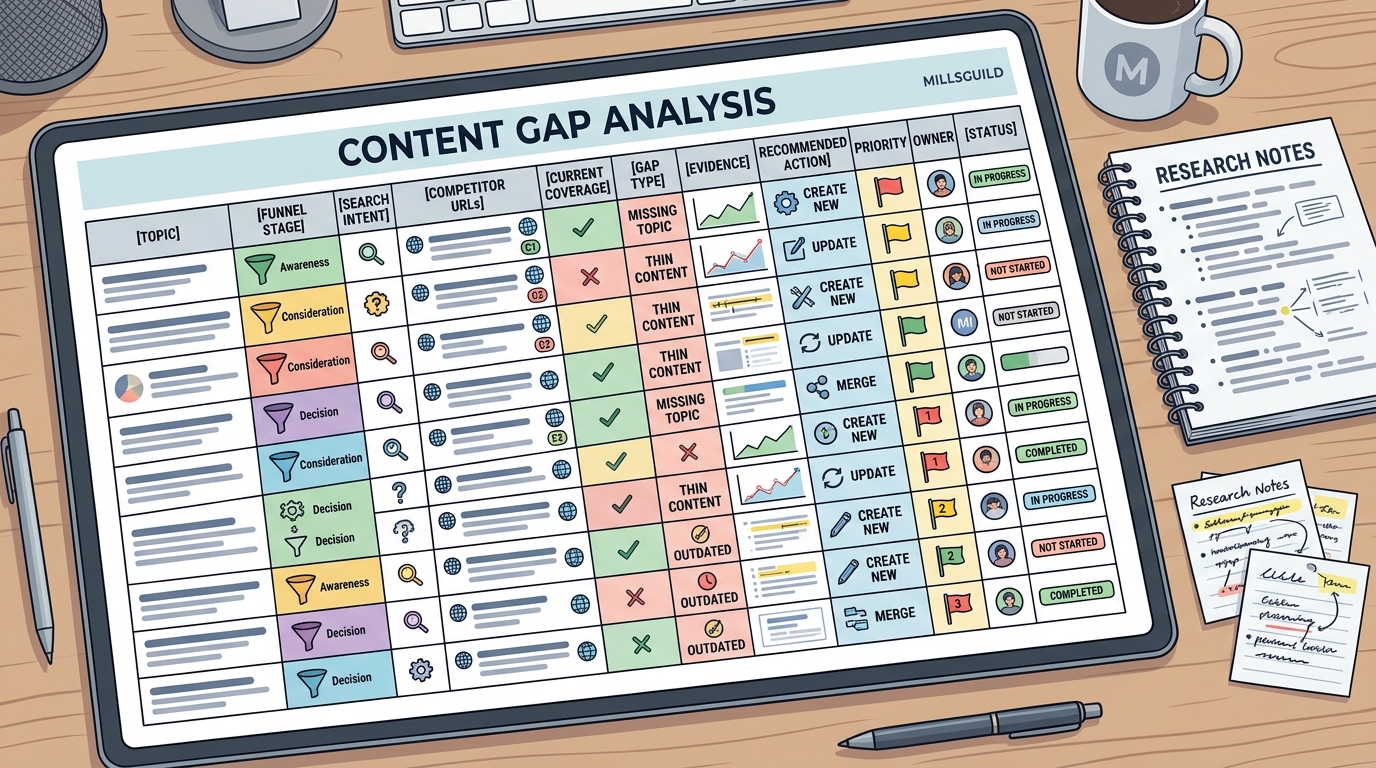
Create the spreadsheet before opening a series of browser tabs. Use columns such as these:
| Column | What to record |
|---|---|
| Topic or query | The audience question or topic cluster |
| Funnel stage | Awareness, consideration, or decision |
| Search intent | Learn, compare, buy, troubleshoot, or navigate |
| Competitor URLs | Two or more relevant examples when available |
| Current coverage | Your existing page or None |
| Gap type | Topic, intent, depth, format, funnel, or freshness |
| Demand evidence | Search Console, Trends, autocomplete, customer question, YouTube, or TikTok |
| Missing value | What the existing results fail to explain or demonstrate |
| Recommended action | Create, update, consolidate, repurpose, or ignore |
| Priority | A simple score or high, medium, low rating |
| Owner and status | Who will act and what happens next |
Do not add search volume unless you have a credible source. An empty cell is better than a made-up estimate.
Step 1: Identify your actual search competitors
Business competitors and search competitors are not always the same. A social media automation company may compete commercially with other software products while competing in search with agencies, publishers, YouTube channels, and individual creators.
Start with five to ten queries closely connected to your offer. Include different types of intent:
- A broad problem, such as
how to create short videos consistently - A workflow, such as
turn blog posts into short videos - A comparison, such as
AI video generator vs video editor - A purchasing question, such as
best social media automation tool for small business - A troubleshooting question, such as
AI captions out of sync
Note the domains that appear repeatedly. A private browsing window can reduce some personalization, but it does not make results completely neutral. Record the date and target country because results change.
Choose three to five domains with meaningful overlap. A site that ranks for one unrelated viral article does not belong in the core set.
Step 2: Sample competitor coverage with Google operators
Google search operators can help you discover a competitor's indexed content without a paid crawler. Try searches such as:
site:competitor.com short-form videosite:competitor.com intitle:automationsite:competitor.com inurl:blog captionssite:competitor.com "content calendar"
Run comparable searches for your own domain. Record relevant competitor pages that appear to have no equivalent on your site, then inspect them manually.
Review navigation menus, blog categories, resource centers, YouTube playlists, and linked templates as well. Search operators are useful for discovery, but they are not a complete index audit. They can omit pages, return inconsistent counts, and order results in ways that do not reflect traffic or business value.
A competitor page belongs in the spreadsheet only when it serves an audience and problem relevant to your business.
Step 3: Examine the search result, not only the competitor page
Open the results for each promising topic and record what the search currently rewards. Check:
- Whether the results are guides, product pages, comparisons, videos, forums, or templates
- How specific the titles are
- Whether the intended reader is a beginner, advanced user, or buyer
- Which subtopics recur across several results
- Which questions appear in result features or autocomplete
- Whether the available content is outdated, vague, or difficult to use
This turns a keyword comparison into an intent analysis.
For example, if several competitors rank for a query about automating short-form video production and the results are workflow tutorials, a generic definition of video automation is unlikely to satisfy the same search. A stronger opportunity might be a step-by-step workflow with an approval checklist, platform-specific export guidance, and a short demonstration.
Do not copy the leading result's headings and add more words. Compare several sources and identify what a reader still needs after using them.
Step 4: Use Search Console to find gaps on your own site
Competitor research reveals external opportunities. Google Search Console shows where your existing coverage is incomplete.
Open the Performance report, select a useful date range, and review queries alongside the pages receiving impressions. Export the data if sorting in a spreadsheet is easier. Google's Search Console Performance report documentation explains the report and its available metrics.
Look for patterns such as:
- A relevant query earning impressions but few clicks
- Several related queries pointing to a broad or poorly matched page
- A page appearing for comparison searches without a comparison section
- A cluster of queries about a feature, limitation, or use case receiving only a brief mention
- An important page with impressions but weak internal support from related articles
Position can help with triage, but it is not an exact, permanent rank. Focus on repeated query and page mismatches.
For each finding, choose one action:
- Update the existing page when its core intent matches but its coverage is weak.
- Create a focused page when the query represents a distinct intent that the current page cannot serve cleanly.
- Add internal links when the right page exists but is poorly connected.
- Consolidate pages when several thin articles compete for the same intent.
- Ignore the query when it does not fit your audience or offer.
Search Console does not reveal a competitor's queries. Its value is confirming whether Google already associates your site with an opportunity found during competitor research.
Step 5: Check whether interest is stable, seasonal, or rising
Google Trends helps distinguish an enduring topic from a temporary spike. Enter a broad topic, set the relevant country and period, and inspect related topics and queries. Google's Trends help documentation explains how Trends data is normalized and how to interpret it.
The related-query view can be switched from top searches to rising searches. This may reveal emerging language and topics. Trends reports normalized interest rather than absolute search volume, so use it as directional evidence rather than a traffic forecast.
Validate a rising query manually:
- Does it fit your product and audience?
- Are current results genuinely useful?
- Is interest concentrated in a country you serve?
- Is it a durable problem or a short-lived event?
- Can you contribute something credible?
Seasonality can affect production timing. If interest rises predictably, prepare the asset early enough for discovery. The appropriate lead time depends on the site, topic, and distribution plan, so avoid assuming a universal schedule.
Step 6: Look for native video gaps
A web-search gap and a video-search gap are not always the same. If your audience learns through video, research the platforms where the content will be published.
YouTube
YouTube Studio includes a Trends tab that helps creators explore what audiences are viewing, find new ideas, and discover content gaps for future videos. Availability and interface details can change, so check the current Studio interface. YouTube documents these capabilities in its YouTube Analytics help documentation.
For each relevant query, review:
- The age of the leading videos
- Whether they answer the query directly
- Recurring questions in comments
- Missing demonstrations or troubleshooting steps
- Whether the need calls for a short answer or a detailed walkthrough
Views alone do not prove that a topic is right for you. Look for unresolved questions and weak execution that you can improve without copying a creator's script, visuals, or branding.
TikTok
TikTok's Creator Search Insights can surface search topics, and its interface has included a content-gap filter. Availability and displayed metrics may vary. TikTok describes the feature in its Creator Search Insights announcement.
Use these findings to choose the format. A question that needs a screen recording could become a tutorial. A narrow misconception might suit a short explanation. A complex comparison may need an article supported by several short videos.
Step 7: Use AI for qualitative comparison

AI can organize notes from several competitor pages, but it cannot verify demand, establish originality, or decide strategic relevance on its own.
Collect only material you are permitted to use. Prepare concise notes or clean text from relevant sections instead of pasting raw page HTML. Keep each source URL attached to its notes so observations can be checked later.
A useful prompt is:
Compare these competitor-page notes for solo founders or small marketing teams. Identify the questions every page answers, the questions only one page answers, and important buyer concerns none of them answers. Separate direct observations from inferences. Do not invent product details, performance data, or audience demand. Return a table with source URLs for each observation.
Review the output manually. A model may overlook a paragraph, merge ideas from different sources, or suggest concerns that do not matter to your audience. Verify material claims against the original pages before using them in an article or video.
AI is helpful for classification and comparison. Editorial judgment remains necessary for source quality, accuracy, originality, and brand voice.
How to prioritize the gaps you find
A gap is not valuable simply because competitors cover it. Score each opportunity from 0 to 3 using factors that reflect your business:
- Audience relevance: How closely does it match a real customer problem?
- Business relevance: Does it connect naturally to something you offer?
- Demand evidence: Is there support from Search Console, Trends, native search, customer questions, or recurring search results?
- Competitive weakness: Can you identify a specific deficiency?
- Distinctive contribution: Can you add a useful example, workflow, template, demonstration, or expert explanation?
- Feasibility: Can your team produce and maintain the asset responsibly?
Add the scores, but keep the notes behind them. The total is a decision aid, not a forecast of rankings or revenue.
A narrow, decision-stage question may be more useful than a broad topic that attracts people who will never need your product. A commercially relevant topic can still be a poor choice if you lack the expertise or evidence to address it well.
Turn each gap into the right production action
Assign an action before opening a blank document.
Create
Create a new asset when the topic has distinct intent and no existing page can satisfy it without becoming unfocused.
Update
Update an existing page when it targets the right intent but lacks depth, clarity, current information, or the expected format.
Consolidate
Combine overlapping pages when several weak assets compete for the same audience need. Plan redirects and internal-link changes carefully if URLs change.
Repurpose
Adapt a strong idea for other formats when the information remains useful across channels. An article can support a short video series, while a demonstration can make a written tutorial easier to follow. Adjust the material to each platform instead of publishing identical assets everywhere.
Ignore
Ignore gaps that do not fit your audience, expertise, offer, or resources. Competitor coverage is not an obligation.
Connect research to production
The handoff from research to production is where lean teams often accumulate disconnected documents, prompts, editors, and scheduling tools.
Once a gap is approved, turn the spreadsheet row into a brief containing:
- The audience and search intent
- The problem to solve
- Evidence supporting the topic
- Competitor references
- The missing value you intend to provide
- Required sources and fact checks
- The primary format and possible supporting formats
- A call to action
- The metric to review after publication
MG Social Studio can support this next stage with AI-assisted research, blog creation, short-form video workflows, publishing, and Growth Copilot recommendations. Its role is to reduce repetitive handoffs while keeping editorial approval with the user.
Start creating with MG Social Studio.
Results vary. AI-generated recommendations and content should be reviewed before publishing.
Measure the result
Choose measurements that match the asset's purpose. For an informational article, review relevant impressions, clicks, engaged visits, and assisted conversions. For a comparison page, product-page visits and qualified actions may matter more than broad traffic. For a video, examine retention, relevant comments, profile or site actions, and follow-up questions.
Record a baseline before publishing. Review results over a meaningful period and annotate major updates. Seasonality, platform changes, distribution, competition, and other work can affect performance, so avoid attributing every change to one revision.
Use the findings as a learning loop:
- Find a gap supported by evidence.
- Publish the most appropriate asset.
- Review how the audience responds.
- Update the content or workflow based on what you learn.
This connects research to execution and audience behavior more effectively than a one-time competitor export.
Common mistakes to avoid
Treating every missing keyword as a new article
Several phrases may express the same intent. Group close variations before creating pages to avoid repetitive content that competes with itself.
Assuming the highest-ranking page is the ideal template
Rankings do not explain every reason a page appears. Compare several results and focus on the unresolved audience need.
Prioritizing estimated volume over business relevance
Broad traffic does not automatically support a business goal. Consider audience fit and funnel stage alongside demand evidence.
Using AI output as proof
An AI model can suggest a gap, but that suggestion is an inference. Confirm it through original pages, search results, first-party data, or customer evidence.
Automating publication without review
Fast workflows can still produce inaccurate or derivative work. Verify claims, check sources, edit for voice, and confirm that the finished asset provides the promised value.
Frequently asked questions
Can I conduct a competitor content gap analysis for free?
Yes. Google Search, Search Console, Google Trends, native platform research tools, customer questions, and a spreadsheet can support a useful manual analysis. Enterprise platforms provide additional estimates and databases, but they are not essential for identifying relevant gaps.
Is a content gap the same as a keyword gap?
No. A keyword gap is a phrase for which a competitor appears and your site does not. A content gap can also involve intent, depth, format, funnel stage, freshness, or an unanswered customer question.
How many competitors should I analyze?
Start with three to five domains that repeatedly appear for queries relevant to your offer. A small, carefully chosen set is easier to analyze well than dozens of superficial examples.
Should every gap become a new page?
No. Many gaps are better handled by updating an existing page, adding a video or comparison section, improving internal links, or consolidating overlapping content.
Can AI perform the entire analysis?
AI can compare notes, cluster topics, and suggest missing questions. It cannot reliably verify demand, source every claim, judge strategic fit, or approve content on your behalf. Keep a human responsible for validation and publication.